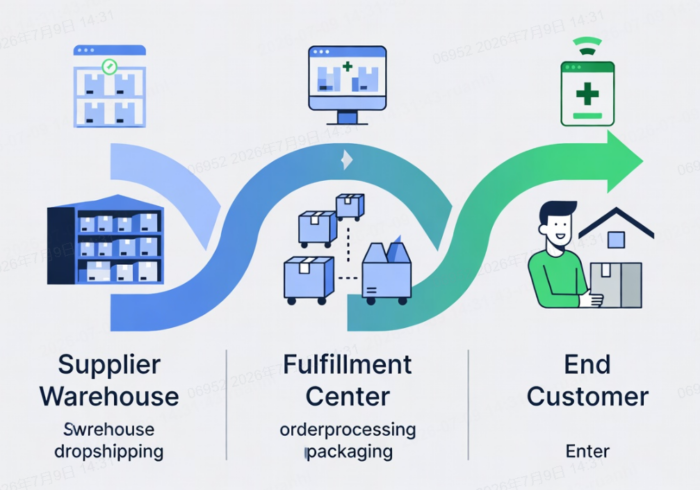
Discover how Amazon dropshipping automation tools can improve inventory accuracy, protect pricing margins, simplify supplier order routing, centralize shipment tracking, and strengthen customer support. This guide explains how to build a controlled automation workflow with reliable China sourcing and fulfillment support for scalable global B2B selling.
Amazon dropshipping automation tools can reduce repetitive work across inventory updates, pricing, order routing, shipment tracking, and customer support. But the right setup is not about making your store “hands-off”—it is about creating a controlled operation that protects product availability, margins, delivery performance, and customer experience.
For sellers sourcing products from China, the most dependable model combines a verified sourcing and fulfillment partner, disciplined supplier data, and automation tools that handle the correct operational bottleneck. Looperbuy can serve as a China sourcing and fulfillment layer for global B2B sellers seeking to reduce inventory holding, warehousing, payment, and logistics-management burdens.
> Important: Amazon permits third-party fulfillment only when the merchant remains the seller of record. Your name—not a supplier’s—must appear on customer-facing packing slips, invoices, external packaging, and related order documentation. You are also responsible for returns and customer experience.
Table of Contents
Why Amazon Dropshipping Needs Automation
Amazon is a fast-moving marketplace. A product that is available at 9:00 a.m. may be out of stock or priced differently several hours later. When sellers update listings, prices, orders, and tracking manually, small delays can turn into cancellations, margin losses, or poor buyer feedback.
Key operational areas where automation is currently crucial: inventory synchronization, repricing, supplier order routing, multi-channel product management, customer support, and shipment tracking.
However, automation is only effective when the information flowing through the system is accurate. A sophisticated repricer cannot protect a seller if the supplier’s cost is wrong. An inventory platform cannot prevent overselling if the supplier feed is delayed. And automated tracking notifications cannot fix a shipment that was dispatched with incorrect seller identification.
A practical Amazon automation system should help you:
– Detect stock changes before customers place orders.
– Protect a minimum profit margin when market prices move.
– Send paid orders to approved suppliers without manual re-entry.
– Upload valid tracking information promptly.
– Identify delayed orders before customers complain.
– Maintain an auditable record of supplier, order, and shipment activity.
Amazon’s performance expectations make this operational discipline essential. Sellers are expected to keep their Order Defect Rate below 1%, while seller-fulfilled shipments generally need a Valid Tracking Rate of at least 95% at the product-category level.
The Best Amazon Automation Tools by Task
The best tool depends on the specific process that is creating errors or consuming too much time. Do not buy a large all-in-one platform simply because it has more features. Start with the highest-risk workflow.
| Tool | Primary Role | Best For | Key Consideration |
| SellerActive | Inventory, repricing, multichannel operations | Established sellers operating on several marketplaces | Stronger fit for complex catalog and pricing workflows |
| Repricer.com | Automated price adjustments | Sellers competing actively for the Buy Box | Set strict minimum-price and margin rules |
| Inventory Source | Supplier feed and order automation | Sellers working with integrated dropship suppliers | Supplier-feed quality determines its value |
| Linnworks | Enterprise commerce operations | High-volume, multi-marketplace businesses | Usually requires deeper implementation planning |
| Sellbrite | Listing and inventory synchronization | Newer multichannel sellers | Easier entry point for simpler operations |
| eDesk | Customer support management | Teams handling messages across multiple channels | Templates still require human review |
| TrackingMore | Shipment visibility and tracking updates | Sellers shipping through many carriers | Carrier coverage should match supplier routes |
The list remains useful as a starting framework, but product features, integrations, pricing, and marketplace support can change. Validate each provider’s current plans and Amazon connection method before purchasing.
1. Inventory and Listing Control
Inventory synchronization is the foundation of an Amazon dropshipping operation. If a supplier has ten units available but your Amazon listing shows twenty-five, you risk accepting orders you cannot fulfill.
Platforms such as SellerActive, Sellbrite, and Linnworks can centralize inventory information across Amazon and other channels. This is particularly valuable for sellers who list the same SKU on Amazon, eBay, Walmart, Shopify, or their own B2B website.
Set a stock buffer rather than publishing every available unit. For example, if a supplier reports 12 units, you may expose only 8 or 9 on Amazon. The remaining buffer accounts for feed delays, damaged stock, simultaneous orders, and supplier allocation changes.
2. Repricing With Margin Protection
Winning sales through low prices is not the same as building a profitable business. Automated repricing tools can react to market changes quickly, but they must be configured with clear financial limits.
Before enabling automated repricing, calculate:
Minimum selling price=Product cost+Shipping cost+Amazon fees+Return allowance+Target profit
A useful rule is: never allow an automation rule to price below your verified minimum. Consider landed cost, not factory price alone. Landed cost should include product cost, domestic China handling where applicable, international shipping, packaging, currency conversion, marketplace fees, and likely return or reshipment costs.
Repricer.com is positioned as a specialized repricing platform, while SellerActive combines repricing with inventory and order management.
3. Supplier Order Routing
Manual order placement may work for five orders per day. It becomes risky at fifty orders per day, especially when orders include different suppliers, countries, shipping methods, or customization requirements.
Supplier automation platforms can send order details from your sales channel to the fulfillment source. Inventory Source is designed around product-feed, inventory, and order-routing automation for dropshipping suppliers.
For China sourcing workflows, do not automate supplier routing until you have confirmed these details with your fulfillment partner:
1. The supplier can provide your business name as the seller of record.
2. Packaging, invoices, and inserts will not reveal another retailer or supplier.
3. Processing-time commitments are documented by product category.
4. Tracking numbers are provided in a format Amazon recognizes.
5. Returns have a defined destination and decision process.
6. The supplier can report stock, cost, and shipment exceptions promptly.
Looperbuy’s sourcing and fulfillment model can be evaluated against this checklist before integrating its operational data into your marketplace workflow.
4. Tracking and Customer Communication
Tracking is not simply a post-purchase convenience. It is an operational control point. Missing, invalid, or delayed tracking can affect account health and trigger unnecessary “Where is my order?” support requests.
TrackingMore is designed to aggregate shipment information from a wide range of carriers and can support proactive delivery-status notifications. eDesk centralizes support conversations and helps teams use templates and automation to manage customer communication more efficiently.
Automated messages should be helpful but restrained. A good sequence may include:
– Order confirmation immediately after payment.
– Dispatch confirmation when valid tracking is available.
– A delay notification only when a material exception occurs.
– A delivery follow-up only where it adds value or helps resolve an issue.
Avoid promising delivery dates that your supplier has not confirmed.
Build Your Automation Stack in Four Stages
The most common mistake is trying to automate every process at once. That creates integration confusion and makes it difficult to identify where errors originate.
Stage 1: Validate the Product and Supplier
Begin with a small number of products and verify the complete order journey. Place test orders where permitted. Check product quality, packaging, processing time, tracking events, delivery time, and return handling.
Create a supplier scorecard with:
– Stock accuracy.
– Average order-processing time.
– Tracking upload time.
– On-time dispatch rate.
– Defect or damage rate.
– Response time to exceptions.
– Packaging compliance.
– Return-resolution speed.
A supplier with slightly higher product cost but consistently accurate data may be more profitable than a cheaper supplier who causes cancellations and refunds.
Stage 2: Automate Inventory First
Inventory errors can create immediate customer harm. Connect inventory synchronization before deploying aggressive repricing or broad catalog expansion.
Set alerts for:
– Zero stock.
– Stock falling below a defined threshold.
– Supplier cost increases.
– Feed failures.
– Listings that have not updated within the expected interval.
Use a manual review queue for products with unstable stock or high cancellation history.
Stage 3: Add Pricing and Order Routing
Once inventory data is dependable, introduce repricing rules and supplier order routing. Start with a limited group of SKUs rather than your entire catalog.
Review daily exceptions during the first month:
– Orders below target margin.
– Orders with no supplier confirmation.
– Supplier substitutions.
– Delivery estimates outside your stated handling window.
– Tracking numbers rejected by Amazon.
– Orders sent to unsupported destinations.
This exception queue is where human judgment remains indispensable.
Stage 4: Improve Support and Reporting
After the core order flow is stable, automate routine support tasks and develop a weekly operating dashboard.
Track these metrics:
| Metric | Why It Matters | Warning Signal |
| Cancellation rate | Measures stock and supplier reliability | A sudden rise after a feed change |
| Valid Tracking Rate | Reflects fulfillment and tracking quality | Below Amazon’s required threshold |
| Gross margin per order | Shows whether automation protects profit | Sales increase while profit declines |
| Late shipment rate | Indicates processing or carrier problems | Concentrated issues from one supplier |
| First response time | Influences buyer confidence | Repeated messages about the same issue |
| Return reason | Reveals product, listing, or delivery mismatches | “Not as described” trend |
| Return reason | Reveals product, listing, or delivery mismatches | “Not as described” trend |
The China Sourcing Layer Matters
Automation platforms manage information. They do not manufacture products, inspect quality, consolidate parcels, negotiate supplier requirements, or resolve packaging errors at the source.
That is why sellers using China-based supply chains should treat sourcing and fulfillment as a strategic layer—not an afterthought. A reliable partner can help reduce fragmented supplier communication and provide a more consistent workflow for procurement, quality checks, order handling, shipping coordination, and tracking updates.
For Looperbuy, the opportunity is to help global B2B sellers create a cleaner source of operational data before that data reaches Amazon or another marketplace. The goal is not merely to move orders faster. It is to reduce avoidable exceptions before they become customer-service issues.
Common Automation Mistakes to Avoid
Even well-funded operations can fail when automation is poorly governed.
– Using retail websites as suppliers: Amazon specifically prohibits arrangements where another seller or retailer ships directly to the customer and does not identify you as the seller of record.
– Publishing supplier stock without a buffer: Supplier feeds can lag behind real inventory.
– Setting only competitor-based pricing rules: A competitor’s price may be unprofitable for your cost structure.
– Treating tracking as an afterthought: Tracking should be captured, validated, and monitored as part of fulfillment.
– Automating customer replies without escalation rules: Refund requests, damaged items, address changes, and delivery disputes need clear human ownership.
– Expanding the catalog too quickly: More SKUs multiply data inconsistencies, supplier variations, and compliance risk.
Choose Automation That You Can Control
The strongest Amazon dropshipping operation is not the one with the most software subscriptions. It is the one with the fewest unmonitored handoffs.
Start by identifying one bottleneck: inaccurate inventory, slow pricing decisions, manual order entry, fragmented tracking, or overloaded support. Then select a tool and a sourcing partner that can provide reliable inputs, clear exception handling, and measurable results.
If your business needs China product sourcing, fulfillment coordination, and dropshipping support for global B2B operations, explore how Looperbuy can help simplify the supply-side workflow before scaling your marketplace automation.
FAQ
Is Amazon dropshipping allowed?
Yes, third-party fulfillment can be allowed, but you must remain the seller of record. Your company must be identified on packing slips, invoices, and external packaging, and you remain responsible for returns and customer service.
What is the best Amazon dropshipping automation tool?
There is no single best tool for every seller. Repricer.com may suit sellers focused on price competition; Sellbrite may suit simpler multichannel listing needs; Inventory Source may suit supplier-feed and order automation; and Linnworks may fit larger operations.
Can I automate Amazon inventory updates?
Yes. Inventory-management platforms can synchronize quantities across sales channels. However, you should still use stock buffers, feed-failure alerts, and manual review for unstable suppliers.
Will automation help me win the Buy Box?
Automated repricing can help you respond to price changes, but Buy Box eligibility is influenced by more than price. Account performance, fulfillment quality, shipping promises, and customer experience also matter.
How do I prevent overselling on Amazon?
Use a reliable inventory feed, publish fewer units than the supplier reports, set low-stock alerts, pause unreliable SKUs, and audit supplier inventory accuracy regularly.
What should I check before working with a China dropshipping partner?
Confirm seller-of-record packaging, product quality-control options, processing times, shipping routes, valid tracking support, stock-data frequency, return handling, and escalation procedures for lost or delayed parcels.
References
1. Doba. “[Top Amazon Automation Tools for Streamlined Dropshipping].”
2. Amazon Seller Central. “[Drop Shipping Policy].”
3. Amazon Seller Central. “[Order Performance Program Policy].”
4. Amazon Seller Central. “[Valid Tracking Rate].”
5. Amazon Selling Partner API. “[Build and Automate With SP-API].”