Comparing Shopify vs WooCommerce for dropshipping in 2026? This expert guide explains setup, SEO, costs, and scalability from real‑world experience, and shows how a sourcing hub like Looperbuy can reduce inventory risk and logistics complexity so you can choose the right platform and grow faster.
Shopify and WooCommerce can both power a profitable dropshipping business, but they serve very different types of entrepreneurs and growth plans. For most new and time-strapped dropshippers, Shopify’s speed and simplicity win; for SEO‑driven brands and technically confident teams, WooCommerce’s control and flexibility are hard to beat. [tibicle]
In this guide, I’ll walk through Shopify vs WooCommerce for dropshipping from the perspective of a practitioner who has helped global B2B and D2C brands launch, scale, and migrate stores across both platforms. I’ll also show you how a sourcing and fulfillment hub like Looperbuy (similar to Doba) can reduce inventory risk and logistics complexity, regardless of which platform you choose. [doba]
This article is written for:
– New and intermediate dropshippers choosing their first platform
– Agencies and brands considering a migration
– Global B2B sellers wanting to add dropshipping alongside wholesale
Table of Contents
Shopify vs WooCommerce For Dropshipping: Quick Verdict
If you want the fastest path to a functional store and are willing to pay for convenience, Shopify is usually the smarter starting point. If you want maximum control over SEO, site architecture, and long‑term ownership of your infrastructure, WooCommerce is the better strategic asset. [tibicle]
From a dropshipping perspective:
– Shopify excels at:
– Fast setup and onboarding
– Stable hosting and security baked in
– A mature app ecosystem for automation and marketing [doba]
– WooCommerce excels at:
– Deep customization for complex catalogs and workflows
– Granular SEO control via WordPress plugins
– Lower long‑term costs for high‑volume brands with in‑house technical skills [tibicle]
For either platform, connecting to a sourcing partner like Looperbuy (or Doba) centralizes products, inventory, and orders so you can focus on marketing and customer experience instead of supplier chaos. [woosa]
How Each Platform Works For Dropshipping
Shopify: Hosted, Opinionated, And Beginner‑Friendly
Shopify is a fully hosted, subscription platform where you rent the infrastructure and get a tightly integrated toolkit for storefront, payments, security, and apps. You pay a monthly fee (plans typically start around 39 USD/month), plus gateway fees and sometimes additional app charges. [mgroupweb]
Dropshipping strengths:
– Guided onboarding, easy theme setup, and built‑in checkout
– Large ecosystem of dropshipping and print‑on‑demand apps
– Solid baseline performance and security handled for you [shopify]
Dropshipping limitations:
– URL structure and some technical SEO elements are fixed
– Advanced customization can require paid apps or developers
– Transaction fees unless you use Shopify Payments [woocommerce]
WooCommerce: Open‑Source, Flexible, And Developer‑Friendly
WooCommerce is a WordPress plugin that turns a content site into a full e‑commerce store, running on hosting you control. The plugin is free, but you pay separately for hosting, domain, and premium themes or extensions. [woocommerce]
Dropshipping strengths:
– Full control over store logic, URL structure, and data
– Best‑in‑class SEO potential thanks to WordPress and plugins like Yoast and Rank Math [woosa]
– Easier to integrate custom or niche B2B workflows if you have technical resources [floship]
Dropshipping limitations:
– You are responsible for performance, security, and updates
– Higher learning curve for non‑technical founders
– Quality of the experience depends heavily on your hosting and plugin choices [woocommerce]
Feature Comparison: Shopify vs WooCommerce For Dropshipping
Key Criteria Table
My Experience: What Real Sellers Underestimate
As someone who has worked with both platforms from the agency side, there are a few patterns I see repeatedly:
1. Founders underestimate operations and overestimate design.
Whether you run Shopify or WooCommerce, your real bottlenecks are usually supplier reliability, fulfillment speed, and customer service— not your homepage layout. That is why a robust sourcing partner like Looperbuy (or Doba) has more impact on NPS than a theme change. [kibocommerce]
2. Most beginners regret going “too custom” too soon.
New dropshippers often get excited about WooCommerce’s flexibility but quickly stall when plugins conflict, pages slow down, or cheap hosting fails under traffic. In contrast, many Shopify users are profitable before they ever touch advanced customization. [avada]
3. SEO‑heavy brands often outgrow Shopify’s structural limits.
For large catalogs with heavy content marketing, fixed URL patterns and limited control over certain technical SEO aspects become a real constraint. Those brands often migrate to WooCommerce or another self‑hosted solution once they have the budget and team. [woosa]
Practical Setup Steps On Each Platform
Getting Started On Shopify For Dropshipping
If I were launching a global dropshipping store on Shopify today, my workflow would look like this:
1. Choose a suitable plan and fast, mobile‑optimized theme. [qualimero]
2. Install a reputable dropshipping app or connector to a sourcing hub like Looperbuy/Doba. [shopify]
3. Configure global settings: markets, currencies, tax rules, and shipping zones, especially if selling cross‑border. [mgroupweb]
4. Build essential pages: About, Shipping & Returns, FAQs, and a clear “How Our Dropshipping Works” explainer. [kibocommerce]
5. Optimize core SEO elements (titles, meta descriptions, image alt text) for your primary product categories and flagship keywords. [avada]
Shopify’s built‑in sitemaps, SSL, and structured templates give you a solid technical foundation without engineering work. [doba]
Getting Started On WooCommerce For Dropshipping
On WooCommerce, I would plan a more technical but more controllable setup:
1. Select a reliable managed WordPress host and configure HTTPS, backups, and caching from day one. [woocommerce]
2. Install WooCommerce and a fast, WooCommerce‑optimized theme. [woocommerce]
3. Configure essential plugins: SEO (Yoast or Rank Math), security, performance, and your dropshipping connector or API integration to Looperbuy/Doba. [woosa]
4. Design your site structure around SEO—category silos, URL patterns, and a content hub for guides and comparison articles. [tibicle]
5. Set up multi‑currency or multi‑language if your B2B buyers span several markets. [floship]
The result is a system you fully own and can extend almost without limits—at the cost of more responsibility for technical health. [tibicle]
SEO Considerations: Which Platform Wins For Rankings?
From a pure SEO standpoint:
– Shopify
– Pros: Clean HTML, mobile‑friendly themes, and essential SEO controls out of the box. [doba]
– Cons: Restricted URL structure and limited access to some technical files (e.g., robots.txt in many setups) can cap advanced strategies. [woosa]
– WooCommerce
– Pros: Full control over URLs, metadata, schema, and content architecture; ideal for long‑form content and content hubs. [doba]
– Cons: Performance and Core Web Vitals depend heavily on hosting and optimization; poor setups can negate SEO advantages. [woocommerce]
Most independent tests and expert opinions agree that WooCommerce has a higher SEO ceiling, while Shopify is “good enough” for most stores that focus on niche selection and backlinks. [woosa]
How A Sourcing Hub Like Looperbuy Fits In
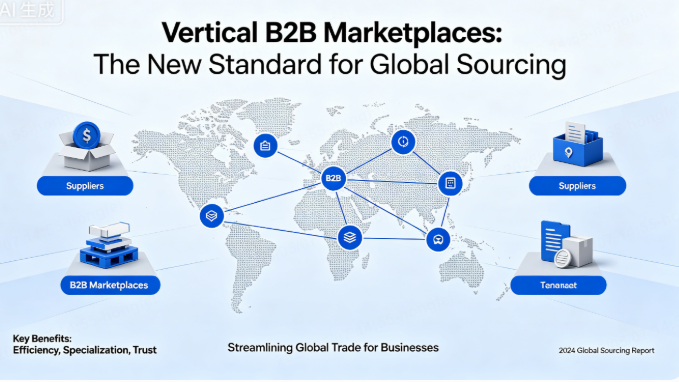
Regardless of your platform, a B2B sourcing and fulfillment hub can radically reduce operational risk:
– Centralized product catalog: Import vetted products from China without managing dozens of supplier relationships. [shopify]
– Inventory sync and order routing: Keep stock information current and automatically push orders to the right supplier, minimizing overselling. [kibocommerce]
– Logistics and cost optimization: Consolidate shipping, reduce warehousing and fulfillment complexity, and often negotiate better rates. [floship]
Tools like Doba already plug into both Shopify and WooCommerce to synchronize products and orders. A platform like Looperbuy can follow the same pattern, functioning as the “supply chain engine” behind either storefront, so you can switch or expand platforms without re‑building your supplier network. [doba]
Real‑World Scenarios: Which Platform Should You Choose?
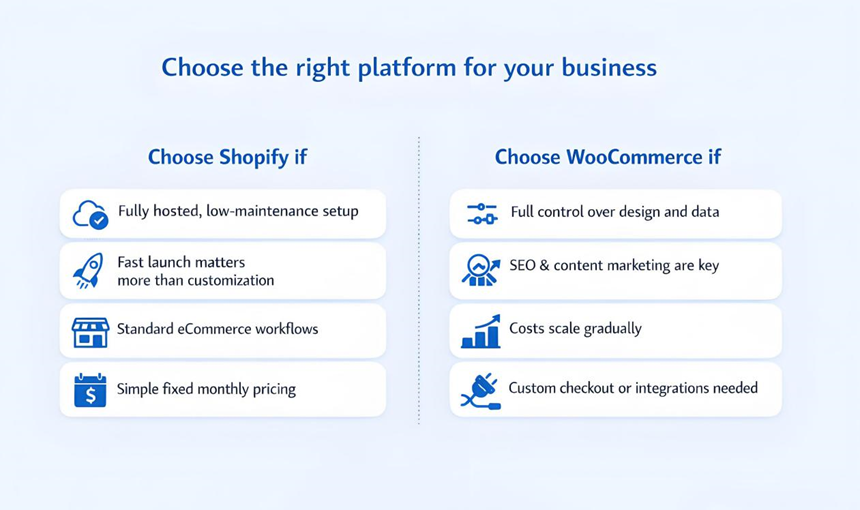
Choose Shopify If…
– You’re launching your first dropshipping brand and value speed over deep customization. [avada]
– You prefer a single, supported environment rather than juggling hosting, security, and plugins. [qualimero]
– Your competitive edge comes from product selection and marketing, not bespoke tech. [kibocommerce]
Choose WooCommerce If…
– You already run a WordPress site with traffic and want to add a store without losing SEO momentum. [tibicle]
– You plan a content‑heavy, SEO‑driven brand where URL structure and technical tweaks are critical. [woosa]
– You have or can access reliable technical help to manage hosting, performance, and custom integrations. [floship]
When A Hybrid Or Multi‑Channel Strategy Makes Sense
Some brands treat Shopify or WooCommerce as just one node in a larger ecosystem:
– Use Shopify as the main D2C storefront while running a WooCommerce or WordPress hub for content and B2B lead generation. [ontapgroup]
– Sell on marketplaces (Amazon, eBay, regional platforms) while syncing inventory centrally via a hub like Looperbuy/Doba. [shopify]
If your goal is global distribution without owning warehouses, a sourcing partner plus a multi‑channel strategy often matters more than your choice of Shopify vs WooCommerce.
UX Best Practices For Dropshipping Stores (On Both Platforms)
Regardless of your platform, a few UX patterns consistently move the needle:
– Clear, honest shipping expectations (especially for cross‑border orders) reduce support tickets and negative reviews. [kibocommerce]
– B2B‑friendly features like bulk order options, tiered pricing, and downloadable spec sheets win business buyers. [ontapgroup]
– Fast, mobile‑optimized experiences are non‑negotiable; a large share of product research and ordering happens on phones. [qualimero]
Use bold text, bullet lists, and modular sections on product and landing pages so busy buyers can scan quickly. For B2B users, always surface MOQ, lead times, and shipping options above the fold. [ontapgroup]
Actionable Checklist Before You Decide
Use this quick checklist as a practical decision aid:
1. Define your 12‑month goal. Revenue target, number of SKUs, and primary markets. [mgroupweb]
2. Rate your technical comfort from 1–10. Below 5 usually points toward Shopify; above 7 means WooCommerce is realistic. [tibicle]
3. Decide how central SEO is to your strategy. If SEO is your main growth engine, WooCommerce deserves serious consideration. [doba]
4. Confirm your sourcing and fulfillment partner. Ensure that Looperbuy (or similar) integrates cleanly with your chosen platform. [kibocommerce]
5. Estimate total cost of ownership, not just monthly fees. Include apps/plugins, hosting, developer time, and your own time. [woocommerce]
Once those five questions are answered, the right choice between Shopify and WooCommerce for dropshipping usually becomes obvious.
If you’re ready to start or upgrade your dropshipping operation, the next step is not to install 20 plugins—it’s to secure a reliable supply chain. Partner with a sourcing and fulfillment platform like Looperbuy to centralize your product catalog, automate inventory and orders, and cut warehousing and logistics costs before you scale your traffic. Then choose Shopify for simplicity or WooCommerce for control, knowing your backend operations are already under control. [floship]
Frequently Asked Questions
1. Is Shopify or WooCommerce better for a complete beginner in dropshipping?
For most beginners, Shopify is easier because hosting, security, and core settings are managed for you, and you can connect to dropshipping apps with minimal configuration. [avada]
2. Which platform is better for SEO in a dropshipping store?
WooCommerce typically wins on SEO because WordPress plus plugins like Yoast and Rank Math give you full control over URLs, schema, and content architecture, while Shopify has a more limited but solid baseline. [woosa]
3. Can I switch from Shopify to WooCommerce later, or vice versa?
Yes, migrations are common, but you will need to handle URL redirects, data export/import, and redesign work; using a central sourcing hub for products and inventory makes the transition easier. [woocommerce]
4. How does a sourcing hub like Looperbuy or Doba help my dropshipping business?
These hubs connect you with multiple suppliers, centralize product data, synchronize inventory, and push orders to the right partners, reducing the need to manage separate relationships or warehouse stock. [floship]
5. Is WooCommerce really cheaper than Shopify for high‑volume dropshipping?
WooCommerce can be cheaper at scale because there is no platform subscription and transaction fee structure like Shopify’s, but you must budget for quality hosting, premium plugins, and ongoing technical maintenance. [tibicle]
References
– Woosa – “Shopify vs WooCommerce: which platform is best for Dropshipping?”[woosa]
– WooCommerce – “WooCommerce vs Shopify”[woocommerce]
– Tibicle – “Shopify vs WooCommerce: Best Dropshipping Platform 2026″[tibicle]
– Doba – “Evaluating Shopify vs. WooCommerce for Dropshipping – Which Platform Wins?”[woosa]
– Doba – “Shopify vs WooCommerce: Which is Best for Dropshipping?”[doba]
– Avada – “Shopify vs WooCommerce Dropshipping: Which is Better for Dropshipping?”[avada]
– Kibo Commerce – “Dropshipping Best Practices for Scalable Ecommerce Growth”[kibocommerce]
– Floship – “B2B eCommerce Platforms Guide 2026″[floship]
– OnTap – “B2B eCommerce Best Practices for Online Store Success”[ontapgroup]
– Shopify – “Best Dropshipping Platforms in 2026″[shopify]