Strategic ecommerce migration is now critical to growth, performance, and customer experience. Learn when to move, how to plan a low‑risk transition, and which tools, architectures, and practices help you modernize your platform without disrupting revenue or data integrity.
A successful ecommerce migration is not just about switching platforms; it’s about building a more resilient, scalable, and user‑centric digital business that can handle rapid growth, complex catalogs, and future innovation without compromising customer experience or profitability.
Table of Contents
Why Your Next Ecommerce Migration Has to Be Different
Over the past decade, I’ve watched too many brands treat ecommerce migration as a “one‑off IT project” instead of a strategic transformation. The result is predictable: lost data, broken customer journeys, traffic drops, and teams burning weekends fixing what should never have gone live.
From my work with B2B sellers and multi‑brand retailers, I’ve learned that a modern migration playbook must balance scale, performance, data integrity, and UX—without disrupting revenue. This article pulls together that real‑world perspective with current industry data to give you a practical framework for planning and executing an ecommerce migration that actually moves the needle.
What eCommerce Migration Really Involves
eCommerce migration is the process of transferring your online store from one platform to another, covering everything from product catalog and customer data to integrations, workflows, and on‑site experience. Companies typically migrate when their existing platform can’t keep up with growth, performance, or modern feature requirements such as advanced personalization or omnichannel selling.
Recent research shows that 61% of B2B ecommerce sellers plan to move to a new platform within 12 months, citing outdated systems as a major barrier to growth. At the same time, private companies report that increased use of AI and new technology investments are among their top priorities, which directly influences platform choices and migration timelines.
Why Modernizing Your Platform Is Now Business‑Critical
Scalability, Performance, and Revenue Protection
Modern platforms can handle larger catalogs and higher traffic volumes with far greater efficiency, especially during peak seasons. When you’re dealing with hundreds of thousands—or even millions—of SKUs, as in the case of Caplugs’ nearly 2 million item catalog, only advanced architecture can deliver acceptable performance.
Performance is not a cosmetic issue: 53% of mobile visits are abandoned if a page takes longer than 3 seconds to load, and conversions drop sharply as load times increase from 2.4 to 5.7 seconds. Some businesses report losing around 15% of annual revenue to poor site performance, illustrating why infrastructure modernization is a financial decision, not a technical luxury.
Common Triggers for eCommerce Migration
1. Outgrowing an Entry‑Level Platform
Many brands start on simple platforms that work well for a limited catalog and basic workflows, but quickly become bottlenecks once order volumes, product variations, or new markets come into play. Industries with high SKU variation—like fashion, apparel, and industrial components—hit these limits first because each product comes in multiple sizes, colors, or technical configurations.
2. Performance and Speed Issues
Slow sites crush conversion rates and brand perception. Businesses that experience frequent timeouts during events like Black Friday or flash sales often discover that their current hosting and platform architecture simply cannot scale efficiently without major rework. Techniques like load balancing, caching, and elastic cloud infrastructure are increasingly non‑negotiable.
3. Rising Maintenance Costs and TCO
Legacy platforms tend to accumulate hidden costs: license fees, custom patchwork, manual maintenance, and escalating infrastructure spend. Gartner has found that organizations without effective cloud cost optimization strategies can overspend on cloud services by up to 70%, primarily due to overprovisioning and inefficient resource usage.
4. Integration Gaps and Fragmented Tooling
Modern ecommerce operations rely on flexible integrations with payment gateways, ERPs, CRMs, PIMs, marketing automation tools, and logistics providers. When older platforms cannot support robust APIs or modern event‑driven patterns, integrations become fragile, making every enhancement slow and expensive.
5. UX and Functionality Limitations
Customer expectations move faster than legacy software. If your platform lacks omnichannel capabilities, advanced personalization, or mobile‑optimized experiences, you risk losing buyers to competitors with smoother journeys. Forrester research suggests that a well‑designed UI can increase conversion rates by up to 200%, while a better overall experience can boost conversions by up to 400%.
6. Admin Complexity and Team Productivity
Clunky admin interfaces and rigid workflows waste internal resources. Modern platforms increasingly provide no‑code or low‑code interfaces, empowering business and merchandising teams to manage content, pricing, and catalogs without constant developer intervention.
7. Security and Compliance Pressure
Outdated stacks often lack current security features and compliance support for regulations such as GDPR and PCI‑DSS. IBM’s 2024 report notes that the global average cost of a data breach has reached around $4.88 million, the highest total recorded to date. This pushes many businesses to migrate primarily for risk reduction rather than new functionality.
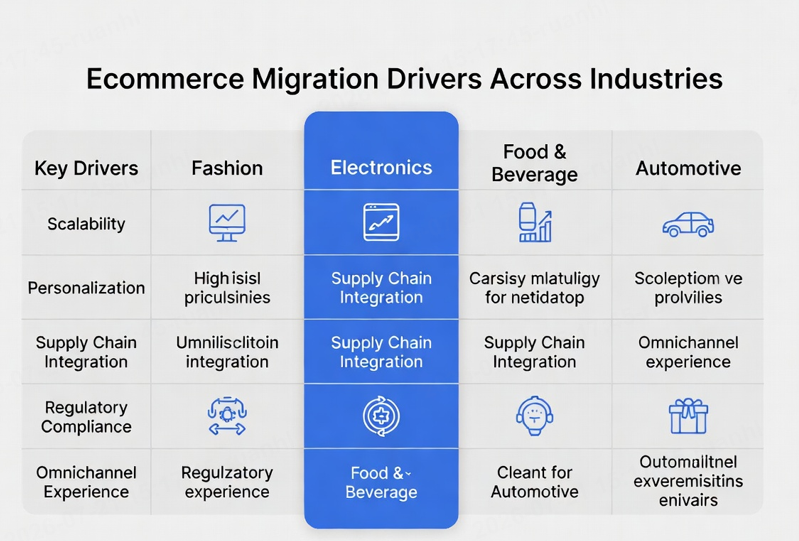
Industry‑Specific Migration Drivers
Different sectors experience platform constraints in different ways.
– Electrical distribution: Needs robust ecommerce to support complex product data, workforce gaps, and B2C‑level digital expectations; companies like Blazer Electric Supply have reported a 175% increase in online revenue after implementing modern ecommerce solutions.
– Fashion and apparel: High SKU variation, personalization, and mobile‑first behavior make scalable architectures and dynamic merchandising essential; luxury brands such as Eton Shirts have migrated to platforms that support digital showrooms and stronger direct‑to‑consumer capabilities.
– Consumer electronics: Frequent product refreshes, technical compatibility concerns, and omnichannel requirements drive adoption of PIM systems, secure transactions, and AI‑powered recommendations.
– Food and beverage: Perishability and regulatory compliance require tight logistics and ordering flows; De Klok Dranken achieved 80% customer adoption on its B2B platform after migrating from a heavy legacy system to a more modular approach.
– Automotive: Complex catalogs and parts compatibility challenges push retailers like OK4WD to adopt platforms that support robust configurators and large inventories, leading to significant improvements in conversions and sales.
When It’s the Right Time to Migrate
If you recognize recurring pain points—unstable performance, rising maintenance costs, integration limitations, or increasing security risk—it’s often cheaper and safer to migrate than to continually patch your existing system. Early recognition matters, because prolonged inefficiencies compound: they slow teams, erode customer trust, and gradually shrink margins.
For businesses already planning major initiatives (new markets, new product lines, omnichannel rollout), aligning those investments with a well‑timed migration can create leverage instead of friction.
A Practical Framework for Planning eCommerce Migration
Step 1: Assess and Prepare
The first phase is about clarity, not code.
1. Define business goals. Focus on outcomes such as revenue growth, cost reduction, market expansion, or improved customer retention, then align technical objectives to support those outcomes.
2. Audit your current platform. Evaluate performance, feature gaps, and operational bottlenecks in areas such as catalog management, fulfillment, and customer service.
3. Analyze key metrics. Review conversion rates, traffic, average order value, and bounce rates to set measurable post‑migration targets.
4. Inventory your data. Identify which product details, customer records, and order histories must be migrated, while leaving cleansing and standardization until you’ve defined the target data model.
Gartner reports that 83% of data migration projects either fail or exceed budget and schedule, largely due to poor data preparation and planning. Treat data work as a dedicated project stream, not an afterthought.
Step 2: Choose the Right Platform
Platform choice sets the ceiling for what your ecommerce business can become in the next 3–5 years. Shopify, Magento, and Virto Commerce are frequently shortlisted because they support different levels of customization, scale, and business complexity.
For B2B and marketplace models, Virto Commerce is designed with headless capabilities, flexible integrations, and modular architecture to support large catalogs, multi‑brand operations, and tailored workflows. A structured Request for Proposal (RFP), combined with vendor demos, can help you compare scalability, integration depth, security posture, and total ownership costs over several years.
Step 3: Define Your Migration Strategy
Two primary migration strategies dominate most projects.
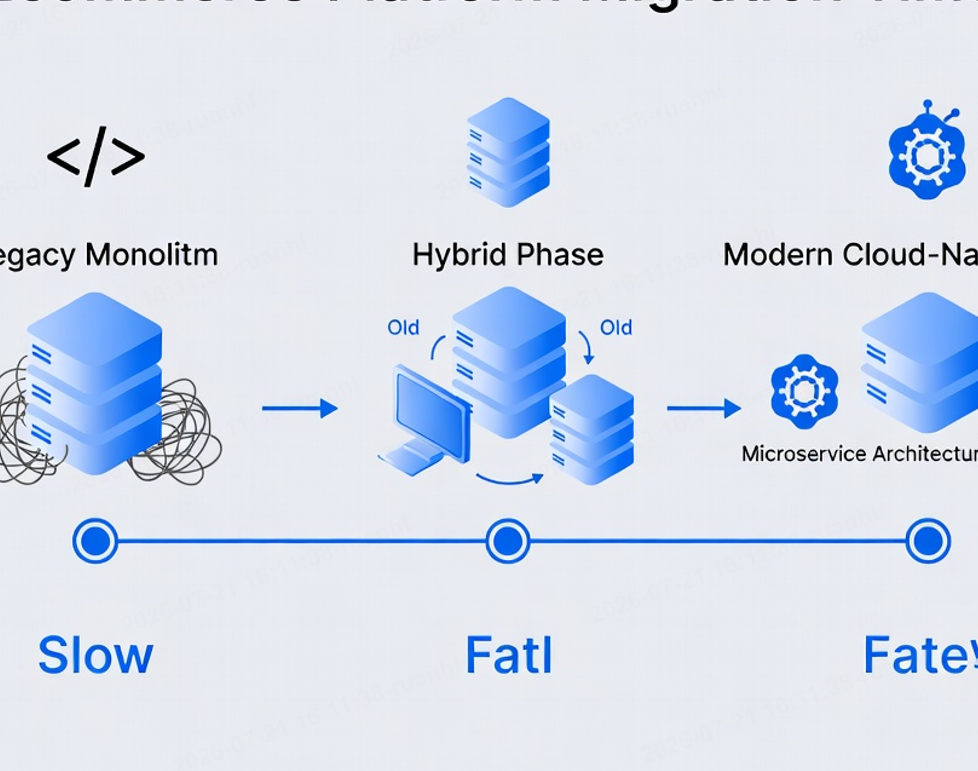
– Big‑bang migration: Move all data and operations at once; faster, but carries higher risk if issues arise because the entire business is affected immediately. [virtocommerce]
– Phased migration: Run old and new platforms in parallel, gradually shifting traffic and data; safer for complex operations but dependent on technical support for coexistence and synchronization.
Smaller stores with limited data may succeed with a well‑planned big‑bang approach, while large B2B or multi‑brand setups usually benefit from phased rollout and extended testing.
Step 4: Build a Realistic Timeline
Breaking migration into clear stages improves governance and reduces stress.
– Stage 1: Data preparation and cleansing.
– Stage 2: Platform configuration and integration.
– Stage 3: Data migration and end‑to‑end testing.
– Stage 4: Full deployment and performance monitoring.
Avoid peak sales periods, and deliberately allocate buffer time for unexpected issues and iterative fixes.
Migration Checklist You Should Not Skip
A structured checklist dramatically reduces risk.
1. Complete comprehensive backups of product, customer, and order data before touching production systems.
2. Define roles and responsibilities, and appoint a project owner with clear authority across business, technical, and operations teams.
3. Prepare plans to update URLs, configure redirects, and preserve key metadata so your existing visibility and discovery are not compromised.
4. Develop pre‑launch testing scenarios that cover performance, payment flows, account management, search and navigation, and integrations.
5. Monitor post‑launch metrics and error logs closely, and respond to early signals quickly.
The Biggest Challenges You’ll Face (and How to Mitigate Them)
Data Integrity and Security
Transferring product catalogs, customer profiles, and order histories without errors is baseline; any inconsistency can trigger customer complaints and operational chaos. At the same time, migration windows can increase exposure to security incidents if not managed carefully.
With the average data breach cost now approaching $4.88 million globally, encryption in transit and at rest, strong access controls, and continuous monitoring should be considered minimum safeguards rather than optional enhancements.
Downtime and Traffic Loss
Unplanned downtime can cost thousands per hour and damage brand trust, particularly for high‑volume operations. Poorly handled structural changes on a website have been linked to dramatic drops in traffic and revenue for months after migration.
Conversely, well‑planned migrations that preserve important patterns and redirect users correctly have been shown to recover quickly and even surpass previous performance within a few months.
Integration and Customization Issues
Custom APIs for inventory, pricing, or logistics often need refactoring for new platforms, and some integrations may become obsolete or incompatible. Mapping existing tools, validating compatibility, and selecting vendors with strong documentation and support can save weeks of rework.
User Experience Disruption
Broken flows, inconsistent design, or slower load times on the new platform can undermine the entire project. Testing critical journeys—from discovery and search to checkout and post‑purchase—before launch is essential to maintain continuity.
Post‑Migration Monitoring and Iteration
Migration doesn’t end on launch day. For several weeks afterwards, you’ll see real‑world usage reveal edge cases and hidden issues in data, workflows, and interfaces. A formal monitoring and incident‑response plan significantly shortens this stabilization period.
Tools and Services That Simplify eCommerce Migration
Specialized agencies and tools can accelerate migration while reducing risk.
– Data migration services: Handle accurate transfer of product, customer, and order data with validation and reconciliation routines.
– Platform migration services: Coordinate infrastructure, configuration, and integration setup for modern, scalable environments.
– Website migration services: Focus on preserving discoverability and experience during front‑end and structural changes.
For smaller or less customized stores, automated tools such as LitExtension support data transfer between more than 120 platforms with a user‑friendly interface. For complex projects, ETL solutions like Talend enable custom data mapping, transformation, and cleansing at scale.
Case Example: Rapid Multi‑Brand Migration in Practice
A recent project described by Valoriz involved migrating seven brand websites and apps to a cloud‑native, multi‑brand ecommerce platform within four months, while keeping operations live. By leveraging MACH architecture—microservices, API‑first design, cloud‑native infrastructure, and headless front‑ends—the team delivered scalable performance, centralized management, and reduced ownership costs.
Technologies such as Next.js for fast experiences, Java Spring Boot for secure backend services, Akeneo for product information, and Microsoft Azure for high‑availability hosting all contributed to a future‑ready environment where the client fully owns its stack and can innovate without vendor lock‑in.
Migration Recommendations for Digital Leaders
For teams considering migration within the next 12–18 months, three steps consistently separate successful projects from stressful ones:
1. Formalize your migration business case. Document pain points, projected benefits, and risk scenarios so stakeholders understand why change is necessary.
2. Shortlist platforms and partners based on your operating model. Align capabilities with B2B, B2C, marketplace, or multi‑brand requirements and existing technology stack.
3. Build a migration roadmap that treats data, integrations, experience, and operations as equal priorities. Ensure clear owners and measurable milestones for each stream.
Done well, migration becomes a catalyst for better performance, stronger customer relationships, and new business models—not just a new control panel for your store.
FAQs
1. How long does a typical ecommerce migration take?
Timelines vary widely, but many mid‑size projects fall in the 3–6 month range, while large multi‑brand or B2B migrations can extend beyond that due to data complexity and integration work.
2. What kind of data should be prioritized for migration?
Core product data, customer profiles, order histories, and key configuration settings should be prioritized, with secondary historical data assessed separately based on business value.
3. How can we minimize disruption to our customers during migration?
Plan changes for low‑traffic periods, maintain clear communication about improvements, and thoroughly test critical journeys—especially checkout and account flows—before going live.
4. Do we need specialized tools for data migration?
For simple stores, built‑in platform tools or solutions like LitExtension may suffice; complex setups typically benefit from ETL tools such as Talend to handle custom mappings and validation.
5. What should we monitor most closely after launch?
Monitor performance, error rates, key behavioral metrics, and user feedback, and maintain a dedicated stabilization phase to address issues quickly in the first few weeks.
References
1. Virto Commerce. “The Biggest Challenges in eCommerce Migration and How to Avoid Them.”[virtocommerce]
2. DesignCoil. “How to Plan a Smooth eCommerce Platform Migration in 2025.”[designcoil]
3. Valoriz Digital. “Ecommerce Migration Case Study: 7 Brands Moved to Cloud.” [valorizdigital]
4. Gartner Research on cloud cost optimization (as cited in Virto Commerce article).[virtocommerce]
5. IBM. “Cost of a Data Breach Report 2024.” (as referenced by Virto Commerce).[virtocommerce]