Learn how BigCommerce dropshipping inventory sync works, compare Doba, Inventory Source, and Syncee, and prevent overselling with SKU mapping, stock buffers, location checks, and supplier acceptance tests. Includes a practical setup plan for sellers sourcing products from China.
BigCommerce dropshipping inventory sync sounds simple: when a supplier’s stock changes, your storefront should change too. In practice, a supplier feed, an integration app, BigCommerce inventory settings, and your order workflow must all agree. This guide explains how to connect those pieces, compare beginner-friendly apps, and build a safer process for sourcing products from China without confusing a sourcing partner with an inventory-sync connector.
A useful rule from an operations perspective: never treat “automated” as a substitute for a documented stock source, a tested SKU mapping, and a fallback plan. Even a fast update can arrive after the final unit sells elsewhere.
Table of Contents
What Inventory Sync Actually Updates
Inventory sync is the transfer of stock availability between a supplier or inventory system and your BigCommerce catalog. A basic integration imports quantities at scheduled intervals. More advanced workflows may react to events, apply stock buffers, update prices, route orders, and return shipment tracking. These are separate capabilities; an app that imports products does not necessarily automate the entire order cycle.
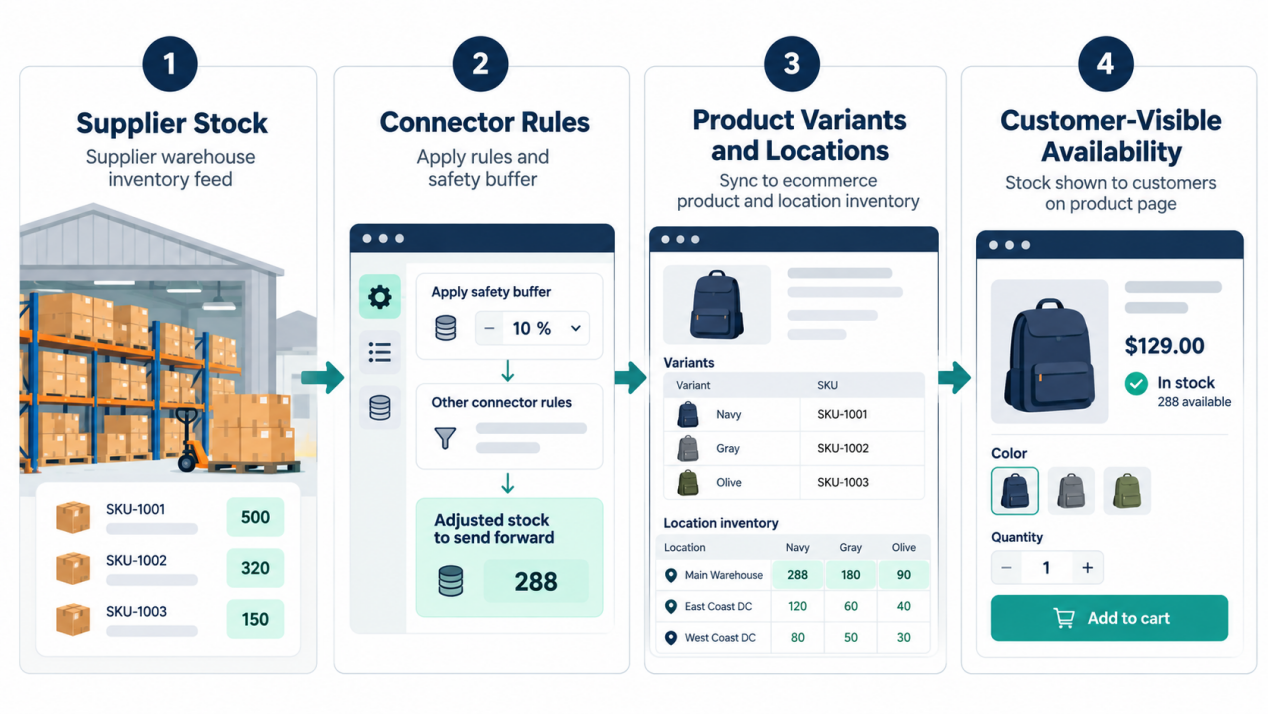
The practical path is supplier quantity → connector rules → BigCommerce product or variant → storefront availability. If the supplier reports 18 blue shirts in size M and your connector reserves three units as a buffer, your store may show 15 sellable units. That buffer is a merchant rule, not proof that 15 pieces are reserved for you.
For products with options, map the exact variant SKU. A blue size-M shirt and a blue size-L shirt should not share a single sellable count unless your supplier truly manages them as one pool. BigCommerce identifies product variants with their own SKUs and supports item-level inventory through its Inventory API.
Inventory sync also differs from order sync. Stock sync changes what shoppers can buy. Order sync transmits purchases to a fulfillment partner. Tracking sync sends shipment information back. Ask vendors to demonstrate all three rather than accepting “fully automated” as a complete specification.
Why Dropshippers Still Oversell
The underlying operational issue is: at the moment of checkout, what inventory is actually available in your store?
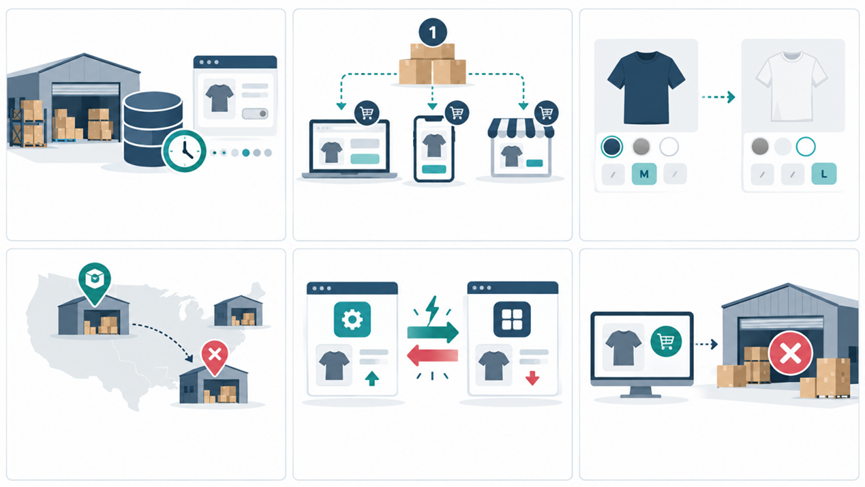
Several gaps can create a false “in stock” label:
– Feed latency: Another seller buys the last units before your next scheduled update.
– Shared supplier stock: The displayed quantity is not reserved for your business.
– Variant mismatch: The connector updates a parent product but not the sold-out size or color.
– Location mismatch: Quantity exists in a location your storefront does not count.
– Conflicting writers: Two apps or a manual edit overwrite each other’s numbers.
– Fulfillment delay: A paid order has not yet been accepted by the supplier.
“Real-time” deserves scrutiny. BigCommerce describes its Inventory API as asynchronous, meaning a successful update request may not immediately appear in a subsequent stock read. Ask an app provider for its observed end-to-end delay—from supplier change to customer-visible storefront change—not just how often it polls a feed.
Check Location-Aware Availability
BigCommerce supports stock at multiple physical or virtual locations. Its documentation says the default Stencil storefront normally uses stock from the default location; aggregated stock across locations is an alternative available by request. Therefore, “the API shows stock” does not always mean “the storefront offers the item.” Test the specific theme, location configuration, and product variant that shoppers will see.
If you combine a China warehouse, a supplier-direct catalog, and overseas stock, confirm which quantities are eligible for each delivery promise. Ten units in China are not interchangeable with ten units ready for urgent domestic shipment. Keep source, ship-from location, and lead time linked to the SKU.
Which BigCommerce Sync App Fits?
The best BigCommerce inventory sync app depends on your supplier model. Do not choose by catalog size alone. Confirm your supplier can provide a usable feed or native connection, then test the app’s behavior on stockouts and orders.
| Option | Documented fit | What to verify before buying |
| Doba | BigCommerce marketplace listing describes product listing, inventory and order synchronization, and fulfillment workflows. | Supplier selection, your shipping destinations, stock-update behavior, and total plan costs. |
| Inventory Source | BigCommerce listing describes supplier-feed monitoring, product uploads, quantity and status updates, and order routing. | Whether your chosen supplier is supported, feed cadence, mapping rules, and the automation tier needed. |
| Syncee | Syncee documents BigCommerce support, product updates, and order-status/tracking synchronization; its help page describes daily automatic updates for its marketplace offering. | The precise update schedule for your plan, supplier coverage, and whether order features suit your workflow. |
| Custom connector or feed | BigCommerce offers location-aware inventory resources and inventory-change webhooks for developers. | Build and maintenance cost, alerting, error retries, and ownership of API credentials. |
No single entry is automatically the best for every merchant. For a short catalog drawn from one supported network, a native app may be simplest. For multiple independent suppliers, prioritize feed flexibility and exception reporting. If a source cannot deliver reliable SKU-level stock data, an integration cannot manufacture accuracy from it.
Important distinction: LooperBuy positions itself as a China sourcing, inspection, warehousing, and global-fulfillment platform. Its public site lists selected platform partners, but does not establish a native BigCommerce inventory-sync integration. If you want to source through LooperBuy while selling on BigCommerce, first confirm the available stock feed, import/export method, or compatible middleware with the team. Do not assume a one-click connector exists.
Set Up Your First Safe Sync
Start with a pilot of 10–20 SKUs rather than importing a full catalog. Include at least one product with color or size variants, one low-stock item, and one product fulfilled from a different location. Your goal is to prove the entire order journey, not merely complete an app installation.
1. Define the source of truth. Decide whether the supplier, a warehouse system, or your inventory hub owns each SKU’s available quantity. Write down who can edit stock and when.
2. Audit supplier data. Request supplier SKU, variant attributes, available-to-sell quantity, feed timestamp, ship-from location, handling time, and discontinued-item status. Ask whether quantities are shared or reserved.
3. Connect one integration. Grant only the permissions required for the planned workflow. Check that product import and stock updates are enabled separately, if the app distinguishes them.
4. Map SKUs and locations. Match each supplier variant to its BigCommerce variant. Check that the location used by the storefront is the location your integration updates.
5. Set conservative rules. Establish a buffer, a low-stock cutoff, behavior for missing feed rows, and a maximum acceptable feed age. If a feed goes stale, pause affected listings or trigger a manual review rather than assuming yesterday’s quantity remains valid.
6. Test the edge cases. Simulate a supplier stockout, a restock, an order, a cancellation, and a failed fulfillment. Compare supplier records, the app dashboard, the BigCommerce admin, and the customer-facing page.
7. Launch with alerts. Record sync errors, unmatched SKUs, stale feeds, and orders awaiting supplier acceptance. Assign an owner to investigate each exception.
A manual stock edit may be useful during an incident, but record it and reconcile with the integration. Otherwise, the next automated update may overwrite your correction. BigCommerce also warns against using a product’s `date_modified` timestamp to infer all inventory changes; developers should use appropriate inventory events instead.
Add a Buffer Without Hiding Demand
A safety buffer reduces exposure to shared-stock volatility. One simple merchant-side rule is displayed quantity = max(0, supplier available quantity − buffer). For example, if a supplier reports 12 units and you withhold four, you publish eight. That is an illustrative policy, not a universal recommendation or a guarantee against overselling.
Set the buffer according to evidence: sales velocity, supplier feed age, the number of sellers sharing stock, order acceptance time, and how often the supplier corrects its counts. Review the rule when promotions or peak-season demand change. A large buffer protects against errors but can suppress legitimate sales.
BigCommerce also has its own location-level safety-stock functionality. Its documentation says safety stock is excluded from the available-to-sell quantity presented to shoppers. Avoid stacking an app buffer and a platform buffer unknowingly, or your storefront may show less stock than intended. Document where each rule is applied and test the result on a low-quantity SKU.
When supplier quantities are not dependable, consider publishing only a small conservative number or requiring confirmation for high-value B2B orders. For made-to-order or customized goods, a delivery estimate and quotation request may be more honest than a live stock counter.
Audit the Entire Order Loop
A reliable feed still leaves gaps after checkout. The operational workflow should answer: Did the supplier accept the order? When will it ship? Who contacts the buyer if the item becomes unavailable? How are tracking and refunds reconciled?
Use a small exception dashboard with five practical measures:
| Measure | What to record | Why it matters |
| Feed freshness | Time since the last successful supplier update | Identifies stale stock before an order fails. |
| Mapping accuracy | Unmatched or duplicate supplier-to-store SKUs | Catches variant errors that quantity checks miss. |
| Stock discrepancy | Supplier quantity versus customer-visible sellable quantity | Reveals buffers, location issues, or conflicting updates. |
| Supplier acceptance | Orders accepted divided by orders submitted | Exposes inventory that exists on paper but is not fulfillable. |
| Tracking delay | Time from dispatch confirmation to buyer-visible tracking | Finds breaks after the sale. |
Start with a daily review of your pilot catalog. After the workflow is stable, prioritize exceptions rather than manually inspecting every healthy SKU. Record failed orders by cause—stale feed, supplier rejection, location mismatch, or mapping error—so the fix targets the actual failure.
When China Sourcing Changes the Equation
If you source from China, stock visibility alone does not establish a reliable delivery date. You may need separate statuses for supplier-available goods, items received at a consolidation warehouse, inspected units, and packages ready for dispatch. These are different promises to the buyer.
LooperBuy says it supports Chinese product sourcing, basic warehouse inspection, consolidation, global shipping, and up to 90 days of free warehousing. These are platform-described services, not a guarantee that every product is physically stocked or that every order has the same lead time. Ask for the applicable terms, current stock confirmation, inspection scope, shipping quote, and fulfillment handoff for your specific SKU.
A sensible division of labor is to use a tested connector or feed process for BigCommerce stock visibility, and a sourcing and fulfillment partner for procurement, quality checks, and delivery coordination. If one vendor offers both, verify each function independently. For branded goods or bulk B2B purchases, also confirm minimum order quantities, packaging approval, compliance documentation, and who pays when goods fail inspection.
Questions to Ask Vendors
Before signing up, request a live demonstration using one of your own supplier SKUs. The answers should be specific enough to put into a service checklist:
– How often is the supplier’s feed refreshed, and when was this SKU last updated?
– Does a zero quantity immediately disable purchasing for the correct variant?
– What happens when a product disappears from the feed or the feed fails?
– Can stock be separated by warehouse and destination market?
– Which system controls buffers, and can you show the customer-visible result?
– Does the app route orders, capture supplier acceptance, and return tracking?
– What happens if two tools attempt to update the same SKU?
– How are errors reported, and what does support cover on your plan?
For a custom integration, BigCommerce provides inventory- and location-change webhook events. That can support monitoring, but a webhook from BigCommerce does not itself provide a supplier’s current stock: the supplier still needs a trustworthy source feed.
Frequently Asked Questions
1. Does BigCommerce automatically sync a dropshipping supplier’s inventory?
Not by itself for every supplier. You need a compatible integration, a supported feed, or a custom connection, plus correct product and variant mapping. Test the published quantity in the storefront rather than relying only on a connected-app status.
2. How often should dropshipping inventory update?
There is no safe universal interval. A high-volume, shared-stock item usually needs tighter monitoring than a slow-moving, reserved product. Ask for the actual supplier-to-store delay and configure stock buffers and stale-feed responses around the risk. Syncee, for example, describes daily automatic updates for its marketplace offering; other arrangements can differ.
3. Can inventory sync eliminate overselling completely?
No. Stock can change between supplier updates, and a supplier may reject an order after your checkout. Sync, conservative sellable quantities, prompt order acknowledgment, and a buyer-contact procedure work together to reduce—not eliminate—the risk.
4. Why does BigCommerce show stock in the admin but not on the storefront?
Check variant-level tracking, the inventory location receiving the update, and your storefront’s location settings. BigCommerce documents a default-location behavior for Stencil that can make stock at another location unavailable to shoppers unless a different configuration is in place.
5. Is LooperBuy a native BigCommerce inventory-sync app?
Do not assume so. LooperBuy publicly describes sourcing and fulfillment services, while its public homepage does not confirm a native BigCommerce connector. Ask its team how SKU-level availability and orders can be exchanged with your store before promising an automated workflow.
6. Should I sync prices and inventory together?
They should be governed by separate rules. An available product can still become unprofitable after a supplier price or freight change. Test price updates, minimum margins, and how the app handles an unavailable or incomplete cost record before enabling automatic repricing.
Build a Workflow You Can Trust
The strongest setup is not the one with the most automation labels. It is the one that tells you which variant is available, where it can ship from, whether the supplier accepted the order, and what happens when any step fails. Pilot a small catalog, measure exceptions, then expand.
If China sourcing and cross-border fulfillment are part of your plan, with a sample SKU list, target markets, expected order volume, and your BigCommerce data requirements. Request a sourcing and fulfillment proposal—and explicit confirmation of how stock and order data would connect to your store—before publishing new listings.
References
1. BigCommerce, [Product variants API documentation]
2. BigCommerce, [Inventory API documentation]
3. Doba, [“Dropshipping Inventory Sync Explained: Best BigCommerce Apps for Beginners”]
4. BigCommerce, [Inventory adjustments and inventory overview]
5. BigCommerce, [Inventory locations]
6. BigCommerce App Marketplace, [Doba integration listing]
7. BigCommerce App Marketplace, [Inventory Source integration listing]
8. Syncee Help Center, [“What is Syncee?”]. Supported platforms and marketplace update features; see also [BigCommerce installation guide].
9. BigCommerce, [Inventory and location webhooks]
10. LooperBuy, [official website]. Platform-described sourcing, inspection, warehousing, fulfillment, and listed integrations