A Samsung phone screen turning black can be alarming, leaving users unsure whether their device is broken, frozen, or simply out of battery. This issue can stem from software glitches, hardware failures, or accidental damage. This comprehensive guide explores the root causes of a black screen, actionable troubleshooting steps, and strategies to prevent future occurrences.
Table of Contents
Common Causes of a Black Screen on Samsung Phones
Software-Related Issues
System Crashes or Freezes
Overloaded RAM, corrupted apps, or incomplete updates can cause the operating system to crash, rendering the screen unresponsive.
Boot Loop Failures
A software update error or incompatible app may prevent the phone from booting properly, leaving the screen black after the Samsung logo.
Hardware-Related Issues
Damaged Display or Flex Cable
Physical impacts or moisture exposure can damage the screen, its connectors, or the flex cable linking the display to the motherboard.
Battery Failure
A depleted or faulty battery may fail to power the display, even if the device charges.
Overheating
Excessive heat from prolonged use or faulty components can trigger safety mechanisms that shut down the display.
Step-by-Step Troubleshooting Guide
Step 1: Rule Out Simple Issues
· “Check the Battery”: Plug the phone into a charger and wait 10–15 minutes. If a charging icon appears, the battery may be drained.
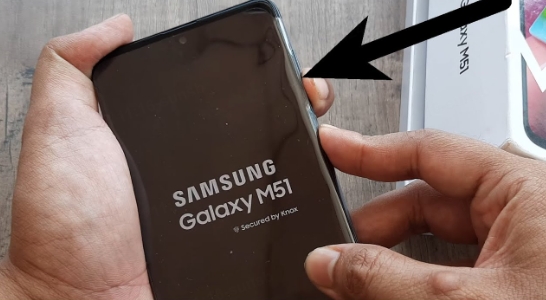
· “Force Restart”: Press and hold the Power + Volume Down buttons for 10–20 seconds to reboot the device.
Step 2: Diagnose Software Problems
Boot into Safe Mode
- Turn off the phone.
- Press and hold the Power button until the Samsung logo appears.
- Release the Power button and immediately hold the Volume Down button.
- Release when “Safe Mode” appears in the corner.
If the screen works in Safe Mode, a third-party app is likely causing the crash. Uninstall recently downloaded apps.
Perform a Factory Reset (Data Loss Warning)
- Boot into “Recovery Mode”: Turn off the phone, then hold Power + Volume Up + Bixby (if applicable).
- Use volume buttons to navigate to Wipe Data/Factory Reset and confirm with the Power button.
Note: Backup data first if possible.
Step 3: Inspect Hardware Components
Test the Display
Connect the phone to a PC or TV via HDMI/USB-C. If the external screen works, the phone’s display is faulty.
Check for Physical Damage
Look for cracks, discoloration, or flickering. If the screen shows faint images under bright light, the backlight may be broken.
When to Seek Professional Help
Signs of Hardware Failure
· No response after force restarting.
· Visible cracks or liquid damage.
· Intermittent screen flickering before total blackout.
Warranty and Repair Options
· “Samsung Service Centers”: Covered under warranty if the issue isn’t due to accidental damage.
· “Third-Party Repair Shops”: More affordable but ensure they use genuine parts.
Preventing Future Black Screen Issues
Software Maintenance
· “Regular Updates”: Install Android and app updates promptly.
· “Avoid Overloading Storage”: Keep at least 10% of storage free.
· “Use Trusted Apps”: Download apps only from the Google Play Store.
Hardware Care
· “Use a Protective Case”: Minimize drop and impact risks.
· “Avoid Extreme Temperatures”: Don’t leave the phone in direct sunlight or freezing conditions.
· “Clean Charging Ports”: Dust or debris can cause charging failures.
Conclusion
A black screen on a Samsung phone can often be resolved through software troubleshooting or minor repairs. By understanding the causes—from app conflicts to hardware damage—users can take proactive steps to revive their device or seek professional assistance. Regular maintenance and cautious usage significantly reduce the risk of recurrence, ensuring long-term device reliability.
How to Purchase:https://looperbuy.com/search?keywords=samsung+phone+screen+goes+black
Related Questions & Answers
· How do I force restart a Samsung phone with a black screen?
Press and hold the Power + Volume Down buttons for 10–20 seconds until the device vibrates or displays the Samsung logo.
· Can data be recovered if the screen stays black?
Yes, if the phone is functional, connect it to a PC via USB and use software like Samsung Smart Switch to backup data. For hardware failures, a repair shop may recover data by replacing the screen temporarily.
· Why does my Samsung screen go black during calls?
This is often caused by a faulty proximity sensor. Clean the sensor (near the earpiece) or recalibrate it via settings (“Settings > Display > Proximity Sensor”).
· Is a black screen covered under Samsung warranty?
Only if the issue is due to manufacturing defects, not accidental damage. Contact Samsung Support for an assessment.
· How much does screen replacement cost?
Prices range from $100–$300 USD, depending on the model. Official service centers charge more but guarantee genuine parts.