In the ever-evolving landscape of personal electronics, charging cables have transitioned from simple power conduits to sophisticated bridges facilitating high-speed data transfer and rapid energy delivery. Among the most pivotal developments in this realm is the A to C charging cable, a ubiquitous connector that links the older, widely adopted USB-A standard with the modern, versatile capabilities of USB-C. This seemingly innocuous accessory plays a critical role in our daily digital lives, powering everything from smartphones and tablets to laptops and external drives. Understanding the intricacies of this cable—its historical context, technical specifications, diverse applications, and crucial selection criteria—is essential for optimizing device performance, ensuring safety, and staying current with technological advancements. This comprehensive guide delves into the fascinating world of the A to C charging cable, unraveling its complexities and illuminating its indispensable role in our connected world.
Table of Contents
A Tale of Two Ends: Understanding USB Standards
To fully grasp the significance of the A to C charging cable, it is vital to first understand the two distinct USB standards it bridges: the enduring USB-A and the revolutionary USB-C. Their individual characteristics and evolutionary paths have shaped the current state of device connectivity.
The Enduring Legacy of USB-A
The Universal Serial Bus (USB) was introduced in the mid-1990s as a universal solution to simplify connections between computers and peripheral devices, replacing a chaotic array of serial, parallel, and proprietary ports. The USB-A connector, characterized by its rectangular shape and single orientation (it only plugs in one way), quickly became the dominant standard. Over two decades, USB-A underwent several revisions, primarily enhancing data transfer speeds:
- USB 1.0/1.1 (Full Speed): Introduced in 1996, offering speeds up to 12 Mbps. Primarily used for low-bandwidth devices like keyboards and mice.
- USB 2.0 (High Speed): Debuted in 2000, increasing speeds to 480 Mbps. This enabled faster connections for printers, digital cameras, and external storage.
- USB 3.0/3.1 Gen 1 (SuperSpeed): Launched in 2008, dramatically boosting speeds to 5 Gbps. This allowed for rapid transfer of large files and was crucial for external hard drives.
- USB 3.1 Gen 2 (SuperSpeed+): Released in 2013, doubling speeds to 10 Gbps.
Despite its continued prevalence, USB-A has inherent limitations: its non-reversible design often leads to fumbling, and its physical size is not ideal for increasingly thin and compact devices. These limitations paved the way for a more advanced connector.
The Dawn of USB-C: A Modern Marvel
USB-C, officially known as USB Type-C, emerged in 2014 as a response to the growing need for a more versatile, powerful, and user-friendly connector. Its key innovations are instantly apparent:
- Reversible Design: Unlike USB-A, USB-C is completely reversible, meaning there’s no “wrong” way to plug it in, eliminating frustration.
- Compact Size: Its small, oval-shaped connector is ideal for the sleek, minimalist designs of modern smartphones, tablets, and ultrabooks.
- Enhanced Capabilities: USB-C was designed from the ground up to support a wide range of advanced features, including significantly higher power delivery, faster data transfer rates, and the ability to carry video and audio signals (via “Alt Mode”).
USB-C is a physical connector shape, distinct from the underlying USB standard (e.g., USB 3.2, USB4, or Thunderbolt). A USB-C port or cable can support various USB specifications, making it incredibly adaptable but also sometimes confusing for consumers.
Bridging Generations: The A to C Charging Cable Defined
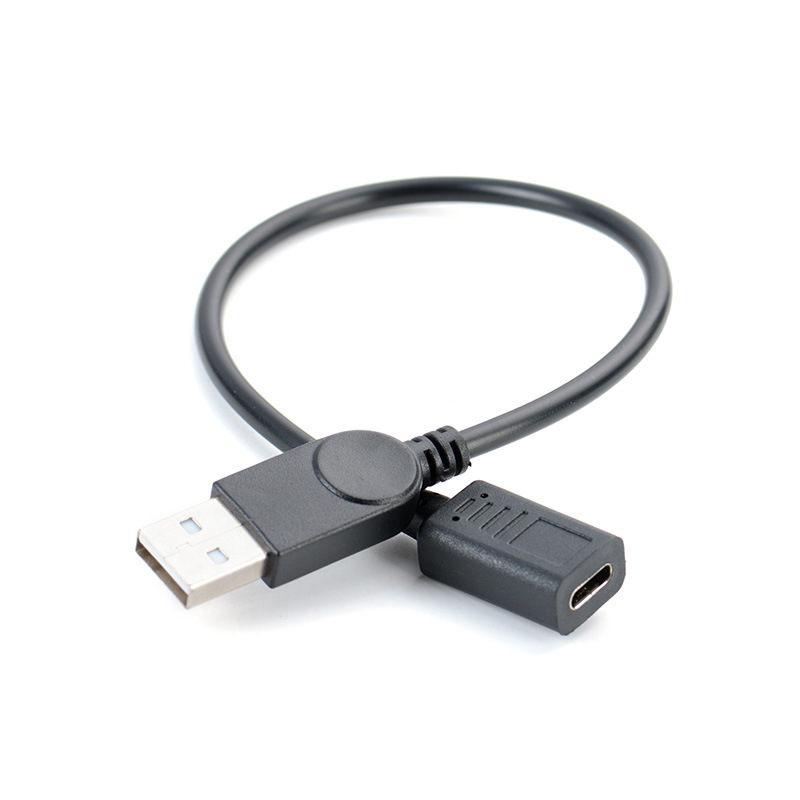
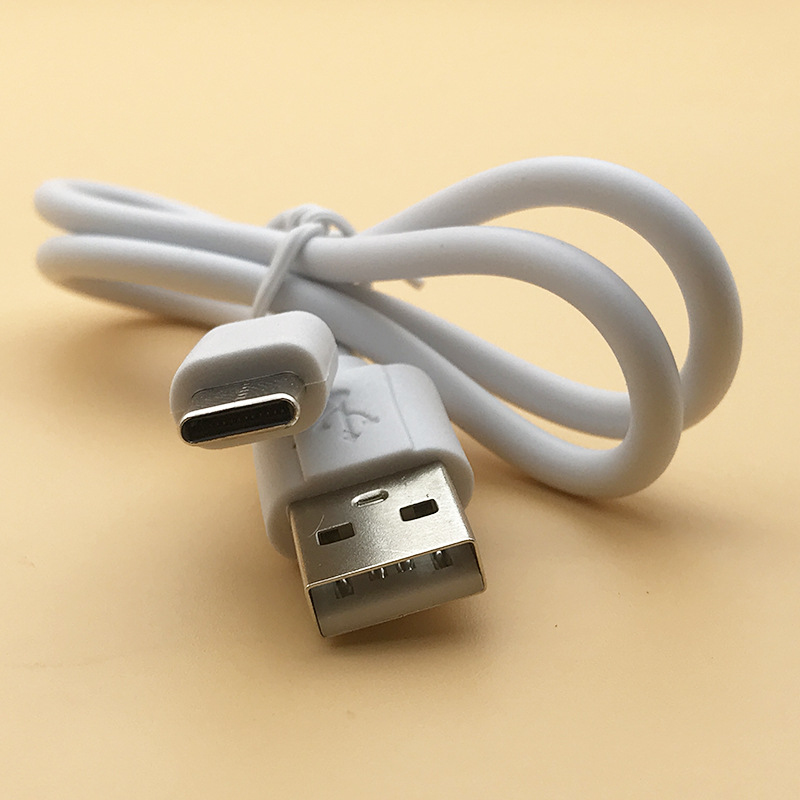
The A to C charging cable, at its core, is a hybrid connector designed to ensure backward compatibility. It features a traditional USB-A plug on one end and a modern USB-C plug on the other. This configuration allows newer USB-C devices to connect to older USB-A ports found on computers, wall chargers, car adapters, and power banks.
The Necessity of Transition
As USB-C rapidly gained traction, particularly with its adoption by major smartphone and laptop manufacturers, a transitional period became inevitable. Millions of existing devices and infrastructure still relied on USB-A ports. The A to C cable emerged as the essential bridge, allowing consumers to charge their new USB-C phones from older USB-A wall chargers or transfer data between a new USB-C tablet and an older laptop’s USB-A port. Without these cables, the adoption of USB-C would have been far more disruptive, creating a chasm between new and old technologies.
Power and Data Capabilities
The capabilities of an A to C cable are largely determined by the lowest common denominator, which is typically the USB-A end.
- Power Delivery: Most A to C cables support standard USB charging rates (up to 2.4A or 12W for USB 2.0/3.0 ports). Some higher-quality cables, when connected to a compatible USB-A port (e.g., Qualcomm Quick Charge enabled ports), can support faster charging protocols. However, they generally cannot achieve the full power delivery capabilities (up to 100W or even 240W with USB PD 3.1) that a pure USB-C to USB-C cable can offer, as USB-A ports do not support USB Power Delivery (USB PD) specifications.
- Data Transfer: The data transfer speed of an A to C cable is typically limited by the USB-A port it’s connected to. An A to C cable designed for USB 3.0/3.1 Gen 1 will achieve 5 Gbps when plugged into a USB 3.0/3.1 Gen 1 Type-A port. If plugged into an older USB 2.0 Type-A port, it will default to 480 Mbps.
It is crucial to understand that while the USB-C end of the cable could technically support faster speeds and higher power, the USB-A end acts as a bottleneck, restricting the overall performance to what the USB-A standard allows.
The Technical Landscape: Protocols and Generations
The world of USB is layered with various protocols and generations, which, when combined with different connector types, can be a source of confusion. The A to C charging cable must navigate this complex technical landscape.
USB 2.0, USB 3.x, and Beyond
The data transfer capabilities of an A to C cable are dictated by the underlying USB specification it adheres to, which is usually determined by the USB-A port.
- USB 2.0 A to C: These cables are the most basic, supporting data speeds of up to 480 Mbps. They are perfectly adequate for charging and connecting devices like keyboards or mice, but will be slow for large file transfers.
- USB 3.0/3.1 Gen 1 A to C: These “SuperSpeed” cables offer data transfer rates of up to 5 Gbps. They are identifiable by the blue plastic inside the USB-A connector on some cables, though this is not always a reliable indicator. These are ideal for connecting external hard drives or high-speed peripherals.
- USB 3.1 Gen 2 A to C: These “SuperSpeed+” cables can support up to 10 Gbps. While USB-C natively supports this, finding a USB-A port that outputs 10 Gbps is less common, making these cables somewhat niche for the A to C configuration. Most commonly, 10 Gbps speeds are achieved with USB-C to USB-C cables connected to compatible USB-C ports.
It’s important to note that the physical cable itself must be designed to support these speeds; a USB 2.0 cable will never achieve USB 3.x speeds, even if connected to compatible ports.
Power Delivery vs. Quick Charge
When it comes to charging, A to C cables generally rely on older fast-charging standards rather than the full might of USB Power Delivery (USB PD).
- Qualcomm Quick Charge (QC): Many Android devices and power banks utilize Quick Charge technology, which operates over USB-A ports. A good A to C cable can support QC, allowing for faster charging than standard USB.
- Other Proprietary Fast Charging: Brands like Samsung (Adaptive Fast Charging) or Huawei (SuperCharge) also have their proprietary fast-charging technologies that can sometimes work over USB-A with compatible A to C cables and chargers.
- USB Power Delivery (USB PD): This is the advanced standard primarily associated with USB-C to USB-C connections, enabling high power levels (up to 240W) and bidirectional power flow. USB-A ports do not support USB PD, so an A to C cable cannot unlock these advanced charging capabilities, regardless of the USB-C device’s potential.
Essential Applications: Where A to C Cables Shine
Despite the rise of pure USB-C ecosystems, the A to C charging cable remains an indispensable tool for a wide range of common tasks and scenarios.
Charging Modern Devices with Legacy Chargers
This is arguably the most common use case. Millions of households have an abundance of USB-A wall adapters, car chargers, and power banks. An A to C cable allows newer smartphones (e.g., Android phones, newer iPhones with USB-C ports), tablets, and other gadgets to charge from these existing power sources, preventing the need to replace all charging infrastructure immediately. It’s a cost-effective and convenient solution for transitioning to USB-C devices.
Data Transfer Between Generations
Many users still have computers, external hard drives, or older peripherals that feature only USB-A ports. An A to C cable enables seamless data transfer between these legacy devices and newer USB-C devices. For example, you can connect a new USB-C tablet to an older laptop to transfer photos or documents, or plug a USB-C external SSD into a desktop with only USB-A ports to access files.
Connecting Peripherals to USB-C Devices
While less common than charging or data transfer to/from a computer, A to C cables can also connect some USB-A peripherals to USB-C devices, often via an adapter or a specialized cable. For instance, a USB-C enabled laptop might use an A to C cable to connect to an older USB-A printer (though direct USB-C to USB-A adapters are more common for this).
Car Connectivity and Android Auto/Apple CarPlay
Modern vehicles often have USB-A ports for infotainment systems, which can support Android Auto or Apple CarPlay. An A to C cable is frequently used to connect USB-C smartphones to these car systems, providing navigation, music, and communication capabilities directly through the car’s display. This ensures continued functionality even as phone manufacturers transition away from older USB standards.
Choosing Wisely: Key Considerations for an A to C Charging Cable
Given the critical role these cables play, and the varying quality on the market, selecting a reliable A to C charging cable requires careful consideration. Not all cables are created equal, and a poor-quality cable can lead to slow charging, data corruption, or even safety hazards.
Safety and Compliance (Resistor)
This is paramount. Early in the USB-C transition, some poorly manufactured A to C cables included an incorrect 10kΩ pull-up resistor instead of the required 56kΩ resistor. This flaw could lead to devices drawing too much current from the USB-A power source, potentially damaging the charger, the cable, or even the connected USB-C device. Always choose cables from reputable brands and look for certifications or indications of compliance with USB standards. Many trustworthy brands explicitly state that their cables include the correct 56kΩ resistor.
Data Transfer Speed (USB 2.0 vs. USB 3.x)
- For charging and basic syncing: A USB 2.0 A to C cable (480 Mbps) is usually sufficient and more affordable.
- For large file transfers (external drives, high-resolution media): Invest in a USB 3.0/3.1 Gen 1 A to C cable (5 Gbps). Ensure both the cable and the USB-A port on your source device support these speeds. USB 3.1 Gen 2 (10 Gbps) A to C cables exist but are less common and often provide diminishing returns unless you have very specific high-bandwidth USB-A ports.
Power Output and Fast Charging Support
Check if the cable supports fast charging protocols like Qualcomm Quick Charge if your devices and chargers use them. High-quality cables can deliver up to 3A or more current, enabling faster charging on compatible USB-A ports. While USB-A is limited compared to USB-C PD, a good cable maximizes the power available from the USB-A source.
Cable Length and Material
- Length: Consider your typical use cases. Shorter cables (0.5m/1.5ft) are great for portable power banks or minimizing desk clutter. Longer cables (1.8m/6ft or more) offer flexibility for charging from distant outlets or comfortable use while plugged in. However, excessively long cables (over 3m/10ft) can sometimes experience signal degradation or slower charging due to resistance.
- Material:
- PVC/TPE: Standard, flexible, and affordable.
- Braided Nylon: More durable, resistant to tangling and fraying, often provides a premium feel.
- Silicone: Increasingly popular for its extreme flexibility, softness, and tangle-free properties.
Connector Quality and Strain Relief
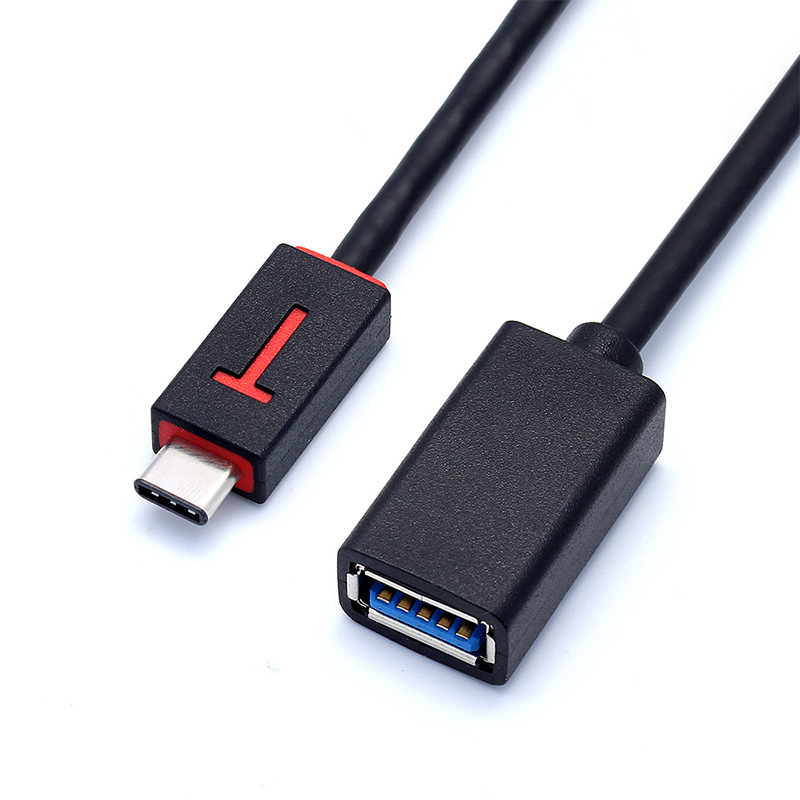
Examine the connectors themselves. They should feel solid and fit snugly into ports. Good cables feature robust strain relief where the cable meets the connector housing. This prevents fraying and internal wire damage from repeated bending, a common point of failure for cheaper cables.
The Lifecycle of a Cable: Care and Maintenance
Even the highest quality A to C charging cables can be damaged by improper handling. A few simple care practices can significantly extend their lifespan and ensure reliable performance.
Proper Handling and Storage
- Avoid Yanking: Always pull the cable by the connector, not by the cord itself. Yanking can strain the internal wires and damage the connector.
- Gentle Bending: Avoid excessively sharp bends or kinks, especially near the connectors, as this can break internal wires.
- Coil Neatly: When not in use, coil the cable loosely rather than wrapping it tightly around devices or accessories. Cable ties or Velcro straps can help keep it organized and prevent tangles.
- Dry Environment: Keep cables away from moisture and extreme temperatures, which can degrade materials and affect performance.
Cleaning and Inspection
- Clean Connectors: Over time, lint, dust, or debris can accumulate in the USB-C connector (and less commonly, the USB-A end). Gently clean ports and connectors with a non-conductive tool like a wooden toothpick or a blast of compressed air. Avoid metal objects.
- Inspect for Damage: Periodically inspect the cable for any signs of wear and tear, such as fraying insulation, exposed wires, or bent pins on the connectors. Discontinue use immediately if damage is found to prevent electrical hazards or device damage.
The Future of Connectivity: A to C’s Role Ahead
While USB-C to USB-C cables represent the pinnacle of current USB connectivity, the A to C charging cable will continue to play a crucial, albeit diminishing, role in the coming years.
A Lingering Legacy: USB-A’s Slow Retreat
USB-A ports are still abundant on older laptops, desktops, car systems, and many public charging stations. Their complete phasedown will take many years, if not decades. This means the A to C cable will remain relevant for backward compatibility as long as USB-A ports exist in significant numbers. It provides a convenient bridge during this extended transition phase.
The Rise of USB-C Exclusive Devices
However, the trend is clear: more and more devices are becoming USB-C exclusive, from ultrabooks that feature only USB-C/Thunderbolt ports to smartphones that no longer ship with a USB-A power adapter. As these devices proliferate, the need for A to C cables will naturally decline in favor of USB-C to USB-C.
Innovation in Cable Technology
Even within the A to C category, ongoing innovation focuses on durability, smart features, and compliance. Expect to see more rugged braided cables, cables with built-in smart indicators, and increasingly reliable compliance testing to ensure safety and performance. The challenge will be for manufacturers to balance cost with genuine quality, especially as the A to C market becomes more commoditized.
Conclusion
The A to C charging cable, a humble yet critical component of our digital ecosystem, serves as the essential bridge between the enduring legacy of USB-A and the innovative future of USB-C. Its widespread adoption has facilitated a smoother transition for countless users, allowing new devices to integrate seamlessly with existing infrastructure for both power and data. Understanding the intricacies of USB standards, appreciating the cable’s technical limitations and capabilities, and making informed choices based on safety, speed, and durability are paramount. As the technological landscape continues to evolve, the A to C cable will remain an indispensable tool for a significant transitional period, embodying backward compatibility and enabling crucial connections in our ever-more-connected world. While the future points towards a fully USB-C native environment, the A to C charging cable will continue to power our devices and transfer our data, ensuring our digital lives remain uninterrupted during this significant shift.
How to purchase:Online B2B sourcing platform, China purchase, Chinese suppliers – LooperBuy
Frequently Asked Questions
- What is the main purpose of an A to C charging cable?The main purpose of an A to C charging cable is to connect newer devices with a USB-C port (like many smartphones, tablets, or laptops) to older power sources or computers that only have a traditional USB-A port. This allows for charging and data transfer, providing backward compatibility during the transition to USB-C.
- What is the difference between USB 2.0 and USB 3.0/3.1 A to C cables?The main difference lies in data transfer speed. USB 2.0 A to C cables support speeds up to 480 Mbps, which is sufficient for charging and basic syncing. USB 3.0/3.1 Gen 1 A to C cables (often referred to as USB 3.0) support much faster “SuperSpeed” data transfer rates of up to 5 Gbps, making them ideal for transferring large files to external hard drives or high-bandwidth peripherals.
- Can an A to C cable support fast charging protocols like USB Power Delivery (USB PD)?An A to C cable generally cannot support the full capabilities of USB Power Delivery (USB PD), which is a more advanced fast-charging standard primarily associated with USB-C to USB-C connections. USB-A ports do not support USB PD. However, a good quality A to C cable can support other fast-charging protocols like Qualcomm Quick Charge (QC) if both your device and the USB-A charger are compatible with QC.
- How can I tell if an A to C charging cable is safe to use?To ensure an A to C charging cable is safe, always purchase from reputable brands that comply with USB standards. Look for indications that the cable includes the correct 56kΩ pull-up resistor, as improper resistors can damage devices. Avoid excessively cheap, unbranded cables, and check for certifications or positive reviews from trusted sources that confirm compliance and safety.
- How does cable length affect charging speed and data transfer?Cable length can affect performance. While shorter cables (e.g., 0.5m to 1m) generally offer optimal performance, excessively long cables (e.g., over 3 meters or 10 feet) can experience voltage drop, leading to slower charging speeds, and signal degradation, which can impact data transfer rates. For critical applications, it’s often best to use the shortest practical cable length.
HOT TAG: A to C Charging Cable, USB-C Technology, USB-A Legacy, Fast Charging, Data Transfer, USB Standards, Cable Compatibility, Device Connectivity, Power Delivery, Quick Charge, Electronic Accessories, Tech Essentials, USB Evolution, Cable Safety, Digital LifestyleRetry