Table of Contents
Introduction
In today’s high-performance computing era, the role of computer radiators is becoming increasingly important. Whether you’re building a gaming PC, a workstation, or a high-end server, selecting the right radiator directly impacts system stability and performance. This article will delve into the key considerations for choosing the best computer radiators, provide detailed recommendations, and help you make informed decisions.
The Core Differences Between Air and Liquid Cooling
How They Work
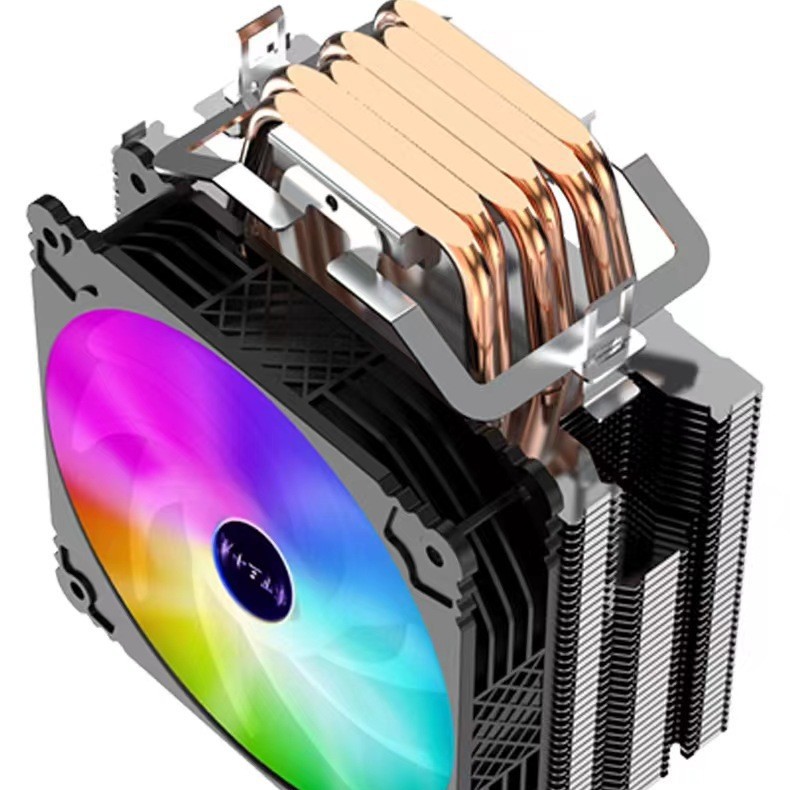
Air coolers transfer CPU heat via copper heat pipes to aluminum fins, which are then dissipated by fans through forced convection. Key components include the base plate, heat pipes, fins, and fans. Their advantages lie in a simple design that is easy to install, zero leakage risks, and affordability. However, they can be bulky and may block RAM slots. Under heavy load, their noise levels can spike to 40-50 dBA, and their thermal performance may be limited for overclocking.
Liquid coolers can be categorized into AIO (All-In-One) and custom loops. AIO coolers feature an integrated pump that circulates coolant to a radiator, while custom loops involve user-assembled tubing, pumps, and reservoir systems. The advantages of liquid cooling include superior cooling performance (e.g., a 360mm AIO can keep an i9-13900K below 60°C), quieter operation at idle (20-30 dBA), and aesthetic flexibility (e.g., RGB lighting and LCD screens like the Thermalright Grand Vision 360). However, they carry leakage risks, necessitate prioritizing brands with warranties (e.g., Corsair offers 3-6 years of coverage), and have more complex installations. Custom loops require tubing expertise, and premium AIOs like the NZXT Kraken X73 can exceed $200 in cost.
Performance Metrics and Real-World Use Cases
In terms of cooling hierarchy, custom loops outperform 360mm AIOs, which in turn outperform premium air coolers (such as the Noctua NH-D15) and 240mm AIOs, which are on par with 6-heat-pipe air coolers. Regarding noise levels, liquid cooling performs exceptionally well at idle but may produce 45-55 dBA under load due to pump noise. In terms of safety, air coolers are more reliable, while liquid coolers require trusted warranties (e.g., Thermalright’s 5-year leak protection).
PC Radiator Recommendations: From Budget to High-End
Entry-Level Builds (i3/i5 non-K, Ryzen 5)
Priorities for entry-level builds include affordability and basic cooling for CPUs with TDPs of 65W-95W. Top picks include the Deepcool AG400 PLUS, a compact 150mm-height cooler ideal for ITX cases at $25, and the Thermalright AXP90-X47, a low-profile downdraft cooler suitable for tight spaces.
Mid-Range Rigs (i7/Ryzen 7, Light Overclocking)
For mid-range builds, the focus is on balancing performance, noise, and aesthetics. Recommended options include the Thermalright Peerless Assassin 120 SE, a dual-tower cooler with six heat pipes that can handle an i7-12700K at 70°C for $36, and the Lian Li Galahad II Trinity 240, a 240mm AIO whose performance rivals some 360mm units.
Flagship Systems (i9/Ryzen 9, Heavy Overclocking)
Flagship systems prioritize taming high TDP CPUs (250W+). Top choices include the Corsair iCUE H170i Elite LCD XT, a 420mm AIO with a customizable IPS screen that keeps an i9-14900K at 55°C, and the Noctua NH-D15, the king of air cooling with dual 140mm fans and near-silent operation.
Installation and Maintenance Tips
Air Cooler Setup
When installing air coolers, ensure adequate case clearance (e.g., the Noctua NH-D15 requires 165mm of space). Apply thermal paste using the “X” method or a pea-sized dot for even spreading. Optimize airflow by aligning fans front-to-back or bottom-to-top to efficiently exhaust heat.
Liquid Cooler Installation
For liquid coolers, prefer top-mounted radiator placements to prevent pump air bubbles. Custom loops should include drain ports and undergo pressure testing for leaks. For AIO coolers, replace the coolant every 2-3 years and monitor pump noise degradation.
Long-Term Care
Air coolers should have their fins cleaned quarterly with compressed air to remove dust. For liquid coolers, inspect tubing annually for cracks (especially for custom loops).
Thermal Validation: Why You Need a Thermal Imager
Software tools like HWMonitor can track CPU temperatures, but hotspots on VRMs, RAM, or SSDs may go undetected. Thermal imaging cameras reveal hidden heat issues before they damage components. The NOYAFA NF-521S Thermal Imager, for instance, offers ±2°C accuracy with real-time heat mapping, a lightweight design for pinpointing airflow gaps or uneven thermal paste application, and PC software for analyzing historical data (e.g., GPU backplate heat soak).
The Future of PC Cooling: Innovations to Watch
Material Science
Graphene thermal pads boast three times better conductivity than traditional thermal paste. Vapor chambers are replacing heat pipes in high-end air coolers.
Smart Cooling
AI-driven pump/fan control (e.g., SilverStone IceMyst 360’s VRM-aware cooling) and app-connected LCD screens for real-time coolant stats are emerging trends.
Eco-Designs
Non-conductive coolants (e.g., 3M Fluorinert) and recycled materials (e.g., Corsair’s radiators made of 80% post-consumer aluminum) are gaining traction.
Final Decision Guide: Choose Your Radiator Like a Pro
| Scenario | Best Fit | Top Picks | Budget |
|---|---|---|---|
| Office/light gaming | Single-tower air cooler | Deepcool AG400 PLUS | $20–$50 |
| Mid-tier gaming/streaming | Dual-tower air/240mm AIO | Thermalright Peerless Assassin | $50–$150 |
| Extreme overclocking/4K rigs | 360mm+ AIO/custom loop | Corsair H170i Elite LCD XT | $150–$300+ |
Pro Tips
- For budget builds, allocate savings to GPU/RAM upgrades.
- Pair Noctua NF-A12x25 fans with AIOs for quieter operation.
- Enthusiasts can consider multi-radiator custom loops (120mm per component).
Conclusion
Selecting the right computer radiator is critical for maximizing system performance and stability. By understanding the differences between air and liquid cooling, choosing radiators tailored to your build’s needs, and following proper installation and maintenance practices, you can ensure optimal cooling for your PC. As technology advances, staying updated on the latest cooling innovations will help you make better decisions for your hardware.
How to Purchase:https://looperbuy.com/search?keywords=computer+radiator
Frequently Asked Questions
What are the best performing 360mm radiators?
The Arctic Liquid Freezer III Pro is widely recognized as one of the best 360mm radiators, offering superior cooling performance and affordability. It efficiently handles high-end CPUs like the i9-13900K while operating quietly. The Thermalright Grand Vision 360 is also an excellent alternative, featuring an LCD screen and delivering top-tier cooling performance at a reasonable price.
How do I choose the right radiator for my PC?
Start by assessing your build’s needs and budget. For entry-level builds, compact air coolers like the Deepcool AG400 PLUS are ideal. Mid-range builds can opt for dual-tower air coolers or 240mm AIOs like the Thermalright Peerless Assassin 120 SE. Flagship systems require high-performance solutions such as the Corsair iCUE H170i Elite LCD XT or the Noctua NH-D15.
Are liquid coolers better than air coolers?
Liquid coolers generally outperform air coolers in cooling efficiency, especially for high-end CPUs and overclocking scenarios. They also tend to be quieter. However, air coolers are more reliable, cost-effective, and easier to install. The choice depends on your specific needs and budget.
What are the best radiator brands?
Renowned radiator brands include Arctic, Thermalright, Corsair, Noctua, Deepcool, and Lian Li. These brands offer a range of products catering to different performance levels and budgets.
How can I maintain my radiator to ensure long-term performance?
For air coolers, clean the fins quarterly with compressed air. For liquid coolers, replace the coolant every 2-3 years and inspect tubing annually for cracks (especially for custom loops). Regularly check for pump noise degradation in AIO coolers.
Hot Tags: Best Computer Radiator; Top Computer Radiator Brands; Best Computer Radiator Types; Computer Radiator Cooling Performance; Affordable Computer Radiator; High-End Computer Radiator; Custom Loop Radiator; AIO Radiator; Computer Radiator Installation; Computer Radiator Maintenance