
In the world of computing, maintaining optimal temperatures is crucial for performance and longevity. As technology advances, the demand for efficient cooling solutions has grown, leading to the rise of external computer radiators. This article explores the significance of external radiators, their benefits, installation processes, and how they can enhance your computer’s cooling system.
Table of Contents
Understanding External Computer Radiators
What is an External Computer Radiator?
An external computer radiator is a cooling device designed to dissipate heat generated by computer components, particularly in liquid cooling systems. Unlike traditional internal radiators, which are housed within the computer case, external radiators are placed outside the chassis. This design allows for improved airflow and heat dissipation, making them an attractive option for high-performance systems.
How Do External Radiators Work?
External radiators operate on the same principles as internal radiators. They use a combination of liquid coolant and fans to transfer heat away from critical components, such as the CPU and GPU. The coolant absorbs heat from these components and flows through the radiator, where it is cooled by the fans before returning to the components. This continuous cycle helps maintain optimal operating temperatures.
Benefits of Using External Radiators
Improved Cooling Efficiency
One of the primary advantages of external radiators is their ability to provide superior cooling performance. By positioning the radiator outside the case, users can take advantage of unrestricted airflow, allowing for more effective heat dissipation. This is particularly beneficial for overclocked systems or high-performance gaming rigs that generate significant heat.
Reduced Noise Levels
External radiators can also contribute to quieter operation. Since they often use larger fans, they can move more air at lower RPMs, resulting in reduced noise levels compared to smaller, high-speed fans typically found in internal radiators. This is especially important for users who prioritize a quiet computing environment.
Flexibility in System Design
Using an external radiator allows for greater flexibility in system design. Users can choose the size and configuration of the radiator that best suits their needs, whether it’s a compact unit for a small form factor build or a larger radiator for maximum cooling potential. Additionally, external radiators can be easily upgraded or replaced without the need to disassemble the entire system.
Aesthetic Appeal
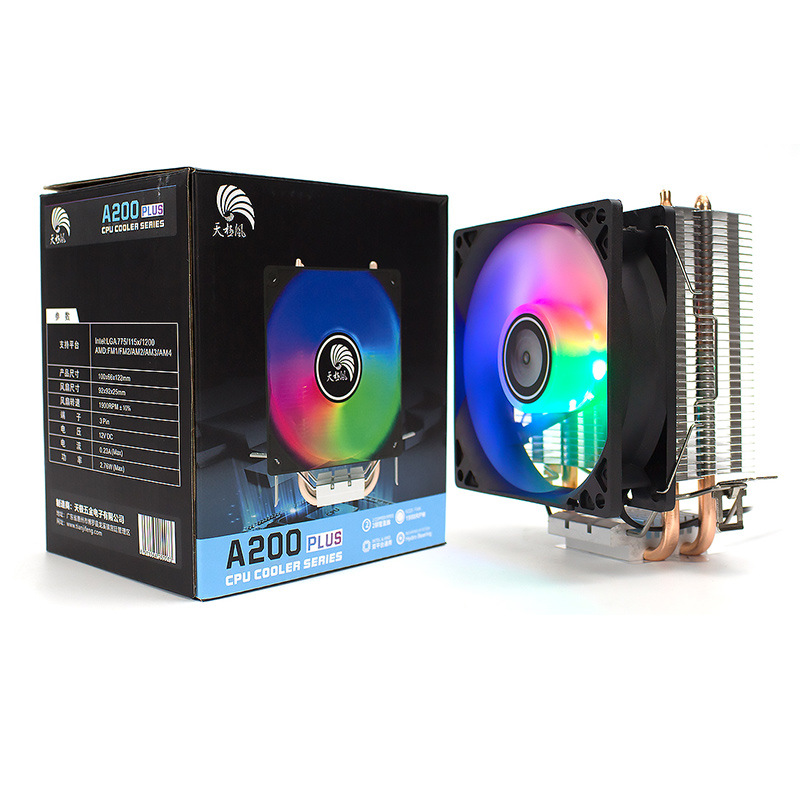
For many enthusiasts, aesthetics play a significant role in their builds. External radiators can enhance the visual appeal of a setup, especially when paired with RGB lighting and custom tubing. This allows users to create a unique and visually striking system that reflects their personal style.
Types of External Radiators
Single vs. Dual vs. Triple Radiators
External radiators come in various sizes, typically categorized as single, dual, or triple radiators. The choice between these options depends on the cooling requirements of the system and the available space.
- Single Radiators: These are compact and suitable for systems with moderate cooling needs. They are often used in smaller builds or as part of a multi-radiator setup.
- Dual Radiators: Offering a balance between size and cooling performance, dual radiators are popular among gamers and overclockers. They provide increased surface area for heat dissipation without taking up too much space.
- Triple Radiators: For extreme cooling performance, triple radiators are the go-to choice. They are ideal for high-end systems that require maximum cooling efficiency, such as those used for gaming, video editing, or 3D rendering.
Material Considerations
External radiators are typically made from aluminum or copper. Each material has its advantages:
- Aluminum: Lightweight and cost-effective, aluminum radiators are popular for their good thermal conductivity and resistance to corrosion. They are often used in budget-friendly builds.
- Copper: Known for its superior thermal conductivity, copper radiators provide excellent cooling performance. However, they are heavier and more expensive than aluminum options. Many high-end builds utilize copper radiators for optimal performance.
Installation of External Radiators
Preparing for Installation
Before installing an external radiator, it’s essential to gather the necessary tools and components. You’ll need:
- The external radiator
- Tubing (typically made of rubber or flexible plastic)
- A pump (if not included with the radiator)
- Coolant (usually a mixture of distilled water and additives)
- Fittings to connect the tubing to the radiator and components
Step-by-Step Installation Guide
- Choose the Location: Select a suitable location for the external radiator. Ensure that it has adequate airflow and is easily accessible for maintenance.
- Connect the Tubing: Attach the tubing to the radiator and the components (CPU and GPU). Ensure that the connections are secure to prevent leaks.
- Install the Pump: If your external radiator does not come with a built-in pump, install it according to the manufacturer’s instructions. The pump should be positioned lower than the radiator to facilitate proper coolant flow.
- Fill with Coolant: Carefully fill the system with coolant, ensuring that there are no air bubbles trapped in the tubing. This step is crucial for maintaining efficient cooling performance.
- Test the System: Before closing up your case, power on the system and check for leaks. Monitor the temperatures to ensure that the cooling system is functioning correctly.
- Secure the Radiator: Once everything is working properly, secure the external radiator in place. Use brackets or mounting hardware as needed to prevent movement.
Maintenance of External Radiators
Regular Cleaning
To ensure optimal performance, it’s essential to clean the external radiator regularly. Dust and debris can accumulate on the radiator fins and fans, obstructing airflow and reducing cooling efficiency. Use compressed air or a soft brush to remove dust buildup.
Checking for Leaks
Periodically inspect the tubing and fittings for signs of leaks. If you notice any coolant pooling around the radiator or components, address the issue immediately to prevent damage to your system.
Coolant Replacement
Over time, coolant can degrade and lose its effectiveness. It’s advisable to replace the coolant every 6 to 12 months, depending on usage and environmental conditions. When replacing coolant, ensure that the system is thoroughly cleaned to prevent contamination.
Troubleshooting Common Issues
Poor Cooling Performance
If you notice that your external radiator is not providing adequate cooling, consider the following:
- Check Airflow: Ensure that the fans are functioning correctly and that there are no obstructions blocking airflow.
- Inspect Tubing: Look for kinks or bends in the tubing that may restrict coolant flow.
- Verify Pump Operation: Ensure that the pump is running and circulating coolant effectively.
Noise Issues
If your external radiator is producing excessive noise, it may be due to:
- Fan Speed: Check the fan speed settings in your system’s BIOS or software. Lowering the fan speed can reduce noise levels.
- Vibration: Ensure that the radiator is securely mounted to prevent vibrations that can lead to noise.
Leaks
If you discover a leak, immediately shut down the system and address the issue. Tighten fittings, replace damaged tubing, or reseal connections as necessary.
Conclusion
External computer radiators play a vital role in enhancing cooling performance for high-end systems. By understanding their benefits, installation processes, and maintenance requirements, users can ensure optimal performance and longevity for their computers. Whether you’re a gamer, content creator, or simply someone who values a well-cooled system, investing in an external radiator can significantly improve your computing experience.
How to purchase:https://looperbuy.com/search?keywords=external+computer+radiator&globalType=1688
Frequently Asked Questions
- What is the primary function of an external computer radiator?
An external computer radiator dissipates heat generated by computer components, particularly in liquid cooling systems, to maintain optimal operating temperatures.
- How do I install an external radiator?
To install an external radiator, choose a suitable location, connect the tubing to the radiator and components, install the pump, fill with coolant, and test the system for leaks.
- What materials are external radiators typically made from?
External radiators are commonly made from aluminum or copper, with each material offering different benefits in terms of weight, cost, and thermal conductivity.
- How often should I clean and maintain my external radiator?
Regular cleaning is essential for optimal performance. It’s advisable to clean the radiator every few months and replace the coolant every 6 to 12 months.
- What should I do if my external radiator is not cooling effectively?
Check for airflow obstructions, inspect the tubing for kinks, and verify that the pump is operating correctly to ensure effective cooling.
Hot Tag: external computer radiator, liquid cooling systems, optimal temperature management, installation guide, maintenance tips, cooling performance enhancement, aluminum vs. copper radiators, troubleshooting cooling issues, computer cooling solutions, gaming rig upgrades.