Table of Contents
The Critical Role of Micro USB Cables in Our Digital Lives
In today’s interconnected world, data transfer has become an essential daily activity. Whether you’re transferring photos from your digital camera, updating firmware on your smartwatch, or moving large files between your computer and mobile devices, the humble Micro USB cable is often the unsung hero facilitating these connections.
The Evolution of Data Transfer Needs
A decade ago, transferring a few megabytes of data was sufficient for most users. Today, with high-resolution images, 4K videos, and massive application files becoming standard, the demand for faster, more reliable data transfer solutions has skyrocketed. Micro USB cables have evolved alongside these needs, offering increasingly higher transfer speeds and improved durability.
Why Micro USB Still Matters in the Age of USB-C
While USB-C is gaining popularity, millions of devices still rely on Micro USB connections. From Android smartphones and tablets to portable game consoles, fitness trackers, and a wide range of IoT devices, Micro USB remains a dominant connection standard. For businesses with existing infrastructure and consumers with device collections, understanding how to choose the best Micro USB cable for data transfer is crucial.
Understanding Micro USB Cable Technology
To make an informed purchasing decision, it’s helpful to understand the technical aspects that differentiate Micro USB cables.
The Anatomy of a Micro USB Cable
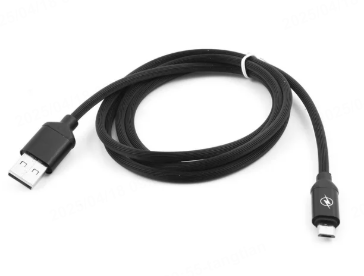
A typical Micro USB cable consists of several key components:
- Connector Type: The distinctive 5-pin Micro USB connector designed for easy insertion and secure connection
- Cable Length: Ranging from 0.3 meters for portable use to 3 meters for extended reach
- Internal Wiring: High-quality copper conductors wrapped in protective insulation
- Braiding and Jacketing: Exterior materials that provide durability and tangle resistance
Transfer Speed Standards
Micro USB cables are categorized by their data transfer capabilities:
- Standard Speed (Up to 12 Mbps): Suitable for basic file transfers and firmware updates
- High Speed (Up to 480 Mbps): Ideal for transferring larger files like photos and standard definition videos
- SuperSpeed (Up to 5 Gbps): The premium option for transferring massive datasets, 4K video content, and backing up entire device storage
Durability Ratings
The lifespan of a Micro USB cable is measured by its bend cycles—the number of times it can be flexed before failure. Quality cables offer between 10,000 to 50,000 bend cycles, making them suitable for daily use in both personal and professional environments.
Key Factors in Selecting the Perfect Data Transfer Cable
With countless Micro USB cables available in the market, narrowing down your options requires focusing on specific criteria.
Device Compatibility
Not all Micro USB cables are created equal. Some are optimized for specific device types:
- Smartphones and Tablets: Look for cables with reinforced connectors to withstand frequent plugging/unplugging
- Cameras and Media Devices: Prioritize cables with shielding to prevent data corruption during transfers
- Industrial and IoT Devices: Consider heavy-duty cables with enhanced durability for harsh environments
Transfer Speed Requirements
Your data transfer needs dictate the minimum speed standard you should consider:
- Casual Users: High-Speed cables (480 Mbps) suffice for everyday transfers
- Content Creators: SuperSpeed cables (5 Gbps) reduce transfer times for large media files
- Enterprise Users: SuperSpeed cables with verified performance metrics ensure reliable backups and data synchronization
Physical Design Considerations
The cable’s physical characteristics impact both usability and longevity:
- Length: Balance between convenience and practicality—shorter cables for travel, longer options for stationary setups
- Braiding and Reinforcement: Nylon braiding prevents fraying and extends cable lifespan
- Connector Reinforcement: Metal housing around connectors adds durability and prevents bending
Top Micro USB Data Transfer Cables Reviewed
After extensive research and testing, these cables stand out as exceptional options for different user scenarios.
Premium Option: Anker PowerLine II Micro USB Cable
This heavy-duty cable offers SuperSpeed transfer capabilities and is reinforced with Kevlar fiber for exceptional durability. Perfect for users who frequently transfer large files and need a cable that withstands rough handling.
Best Value: AmazonBasics Micro USB Cable (3-Pack)
For budget-conscious buyers without compromising on essential features. These High-Speed cables come in multiple lengths and include basic durability features suitable for everyday use.
Specialized Option: Monoprice Premium Micro USB Cable
Engineered for audio enthusiasts and professional media transfer, this cable minimizes electromagnetic interference during data transmission. Ideal for transferring large audio and video projects without corruption.
Travel-Friendly: Cable Matters Braided Micro USB Cable
At 0.9 meters, this compact cable offers a perfect balance between portability and functionality. The braided design resists tangling, and it supports High-Speed data transfer for efficient backups on the go.
Industrial Grade: Tripp Lite Industrial-Strength Micro USB Cable
Built to withstand extreme conditions, this cable features a rugged exterior and reinforced connectors. Suitable for manufacturing environments, outdoor installations, and other challenging settings where reliability is paramount.
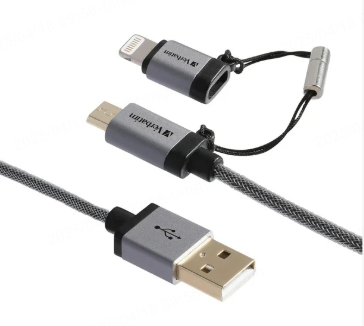
Maximizing Your Data Transfer Experience
Even the best cable won’t perform optimally without proper usage practices.
Optimizing Transfer Speeds
Several factors can affect actual transfer speeds:
- Device Compatibility: Ensure both connected devices support the cable’s maximum speed rating
- Port Selection: Use USB 3.0 ports on computers for SuperSpeed transfers
- File System Limitations: Some older file systems cap transfer speeds regardless of cable capabilities
Maintenance Tips for Longevity
Extend your cable’s lifespan with these simple practices:
- Avoid sharp bends and kinks during storage
- Use gentle pressure when connecting to prevent port damage
- Periodically inspect connectors for debris and clean with compressed air
Troubleshooting Common Issues
If you encounter transfer problems:
- Test the cable with different ports and devices to isolate the issue
- Check for damaged connectors or exposed wiring
- Verify that both devices have the latest firmware and drivers installed
Conclusion
Selecting the right Micro USB cable for data transfer requires balancing speed requirements, device compatibility, and physical design. Whether you’re a casual user needing reliable everyday performance or a professional requiring lightning-fast transfers for large datasets, the perfect cable exists to meet your needs. By understanding the technical specifications and considering your specific usage scenario, you can invest in a cable that enhances your digital workflow and stands the test of time.
How to Purchase:https://looperbuy.com/search?keywords=data+transfer+micro+usb+cable
Frequently Asked Questions
Q: Can I use any Micro USB cable for data transfer?
A: While most Micro USB cables support basic data transfer, the speed and reliability vary significantly. For optimal performance, especially with larger files, choose cables rated for High-Speed or SuperSpeed transfers that match your device capabilities.
Q: How long should a data transfer take with a good Micro USB cable?
A: Transfer times depend on file size and cable speed. A 2GB high-definition video would take approximately 1 minute with a High-Speed cable and just 10 seconds with a SuperSpeed cable. Always consider your typical file sizes when selecting a cable.
Q: Are braided Micro USB cables worth the extra cost?
A: Braided cables offer significantly improved durability and tangle resistance. For users who frequently move or travel with their cables, the investment in braided options typically results in longer usable life and reduced replacement costs over time.
Q: Can I use a Micro USB cable for charging and data transfer simultaneously?
A: Most modern Micro USB cables support simultaneous charging and data transfer. However, some older devices may require you to choose one function at a time through software settings.
Q: How do I know if my Micro USB cable is failing?
A: Common signs of cable failure include intermittent connections, transfer errors, or significantly slower speeds than rated. Visible damage to the cable or connectors is also a clear indicator that replacement is needed.