In today’s digital age, the need for efficient and reliable data transfer methods is more critical than ever. With the increasing volume of data we handle daily, understanding how data cable transfer works can significantly enhance our file-sharing experience. This article delves into the intricacies of data cable transfer, exploring its types, benefits, and practical applications. By examining the various aspects of data cable transfer, we can appreciate its role in our increasingly connected world.
Table of Contents
Understanding Data Cable Transfer
Data cable transfer refers to the process of transferring data between devices using a physical cable. This method is often preferred for its speed and reliability compared to wireless alternatives. The most common type of data cable used for this purpose is the USB (Universal Serial Bus) cable, which has become a standard in connecting various devices. The simplicity of connecting devices with a cable allows for immediate data transfer without the need for complex setups or configurations, making it accessible for users of all technical levels.
The Evolution of Data Transfer Cables
Data transfer cables have evolved significantly over the years. Initially, parallel and serial cables were the primary means of connecting devices. These older technologies had limitations in terms of speed and compatibility, often requiring specific configurations for different devices. However, with the advent of USB technology, data transfer became faster and more efficient. USB cables come in various types, including USB-A, USB-B, and USB-C, each serving different purposes and devices. The introduction of USB-C, in particular, has revolutionized the way we connect devices, offering a reversible design and the ability to transfer both data and power through a single cable.
Types of Data Cables
There are several types of data cables used for transferring files, each designed for specific applications and devices.
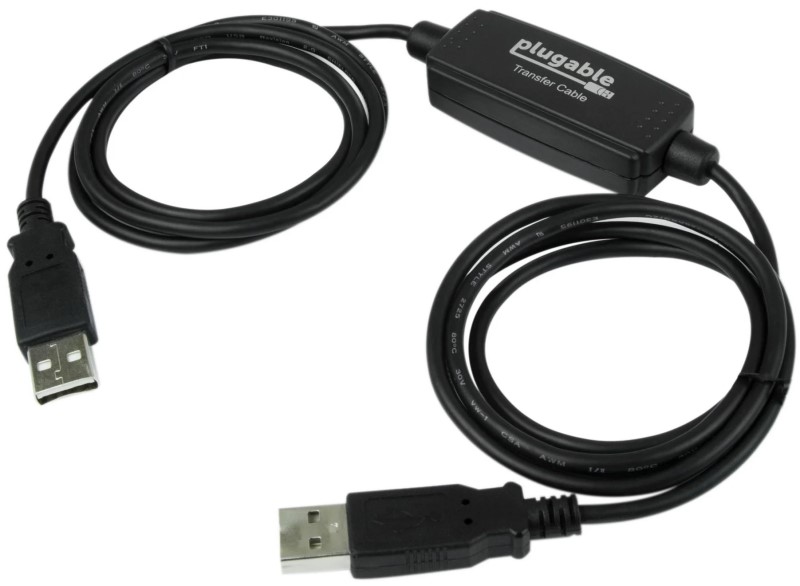
– USB Cables: The most common type, used for connecting a wide range of devices, including computers, smartphones, and external hard drives. USB cables have become ubiquitous in our daily lives, powering everything from charging our phones to connecting peripherals like keyboards and mice.
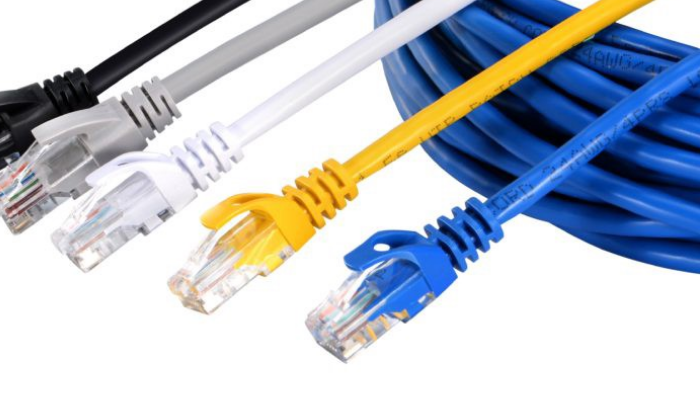
– Ethernet Cables: Primarily used for network connections, these cables can also facilitate data transfer between devices on the same network. Ethernet cables provide a stable and fast connection, making them ideal for transferring large files in a local area network (LAN).
– Thunderbolt Cables: Known for their high-speed data transfer capabilities, Thunderbolt cables are often used for connecting high-performance devices like external SSDs and displays. Thunderbolt technology allows for daisy-chaining multiple devices, which is particularly useful in professional settings where multiple peripherals are used simultaneously.
Benefits of Using Data Cables for Transfer
Using data cables for file transfer offers numerous advantages over wireless methods.
Speed and Efficiency
One of the most significant benefits of data cable transfer is speed. USB 3.0 cables can transfer data at speeds up to 5 Gbps, while USB 3.1 and Thunderbolt 3 can reach speeds of 10 Gbps and 40 Gbps, respectively. This speed is particularly beneficial when transferring large files, such as videos or high-resolution images. The efficiency of data cable transfer means that users can spend less time waiting for files to transfer and more time focusing on their tasks, enhancing overall productivity.
Reliability
Data cable transfers are generally more reliable than wireless transfers. They are less susceptible to interference from other devices or environmental factors, ensuring that the data reaches its destination without corruption or loss. This reliability is crucial in professional environments where data integrity is paramount, such as in medical or financial sectors where even minor data loss can have significant consequences.
Security
Transferring data via cable is inherently more secure than wireless methods. With a physical connection, the risk of unauthorized access is significantly reduced, making it a preferred choice for sensitive information. In an age where data breaches are increasingly common, using data cables can provide peace of mind, especially when handling confidential files or personal information.
How to Use Data Cables for File Transfer
Transferring files using a data cable is a straightforward process. Here’s a step-by-step guide to help you get started.
Step 1: Choose the Right Cable
Select a data cable compatible with both devices. For instance, if you are connecting a laptop to a smartphone, ensure you have the appropriate USB cable. Using the correct cable is essential for ensuring optimal transfer speeds and compatibility, as different cables support different data rates and functionalities.
Step 2: Connect the Devices
Plug one end of the cable into the source device and the other end into the destination device. Ensure that both devices are powered on. This simple step is often overlooked, but ensuring that both devices are ready to communicate is crucial for a successful transfer.
Step 3: Initiate the Transfer
On most devices, once connected, a prompt will appear asking if you want to transfer files. Follow the on-screen instructions to select the files you wish to transfer. This user-friendly interface simplifies the process, making it accessible even for those who may not be tech-savvy.
Step 4: Complete the Transfer
Once the transfer is complete, safely eject the devices to avoid data corruption. This step is crucial, especially when using external drives. Properly ejecting devices ensures that all data has been written and prevents potential data loss, which can occur if a device is disconnected prematurely.
Common Applications of Data Cable Transfer
Data cable transfer is widely used in various scenarios, including:
Transferring Files Between Computers
When upgrading to a new computer, using a data cable can simplify the process of transferring files from the old machine. Many data transfer cables come with software that facilitates this process, making it seamless and efficient. This capability is particularly useful for users who have accumulated large amounts of data over the years and want to ensure that nothing is lost during the transition.
Backing Up Data
Data cables are also essential for backing up data to external hard drives or cloud storage. By connecting your device to an external drive, you can quickly transfer large amounts of data for safekeeping. Regular backups are crucial for data security, protecting against hardware failures, accidental deletions, or malware attacks.
Connecting Peripheral Devices
Many peripheral devices, such as printers and scanners, require a data cable for connection. This ensures that data is transmitted quickly and reliably, enhancing productivity. In office environments, having reliable connections to printers and other devices can streamline workflows and reduce downtime.

Troubleshooting Common Issues
While data cable transfer is generally straightforward, users may encounter some common issues.
Cable Compatibility
Ensure that the cable you are using is compatible with both devices. Using the wrong type of cable can lead to connection failures. It’s important to check the specifications of both devices to avoid frustration during the transfer process.
Driver Issues
Sometimes, the necessary drivers for the devices may not be installed. Check the manufacturer’s website for the latest drivers and install them as needed. Keeping drivers updated is essential for maintaining compatibility and performance, especially with newer devices.
Connection Problems
If the devices do not recognize each other, try using a different cable or port. Sometimes, the issue may lie with the port rather than the cable itself. Testing different configurations can help identify the source of the problem and ensure a successful connection.
Future of Data Cable Transfer
As technology continues to advance, the future of data cable transfer looks promising. With the development of faster data transfer technologies and improved cable designs, users can expect even more efficient and reliable methods for sharing files.
Innovations in Data Transfer Technology
Emerging technologies, such as USB4 and Thunderbolt 4, promise to enhance data transfer speeds and capabilities further. These innovations will likely lead to new applications and uses for data cables in various fields, including gaming, video editing, and data analysis. As these technologies become more mainstream, users will benefit from faster and more versatile data transfer options.
The Role of Wireless Alternatives
While data cables offer numerous benefits, wireless transfer methods are also evolving. Technologies like Wi-Fi 6 and Bluetooth 5.0 are improving the speed and reliability of wireless transfers, making them a viable alternative for many users. However, for those who prioritize speed and security, data cables will remain a preferred choice. The coexistence of both methods allows users to choose the best option for their specific needs, whether it be for convenience or performance.
Conclusion
Data cable transfer is an essential aspect of modern computing, providing a fast, reliable, and secure method for sharing files. Understanding how to utilize data cables effectively can enhance your productivity and streamline your workflow. As technology continues to evolve, staying informed about the latest developments in data transfer will ensure you make the most of these tools. Embracing data cable transfer not only improves efficiency but also contributes to a more organized and secure digital environment.
How to purchase:https://looperbuy.com/search?keywords=Data+Cable+Transfer
Frequently Asked Questions
1.What is a data transfer cable?
A data transfer cable is a physical cable used to connect devices for the purpose of transferring data between them. These cables can vary in type and functionality, catering to different devices and transfer needs.
2.How fast can data transfer cables transfer files?
Data transfer speeds vary by cable type, with USB 3.0 offering speeds up to 5 Gbps and Thunderbolt 3 reaching up to 40 Gbps. The choice of cable can significantly impact the efficiency of data transfers, especially for large files.
3.Can I use any USB cable for data transfer?
Not all USB cables are created equal. Ensure that the cable is designed for data transfer, as some cables are meant solely for charging. Using the correct cable is crucial for achieving optimal performance.
4.Is data cable transfer secure?
Yes, data cable transfer is generally more secure than wireless methods, as it requires a physical connection, reducing the risk of unauthorized access. This security is particularly important for sensitive data transfers.
5.What should I do if my devices do not recognize the data cable?
Check for compatibility issues, ensure that the necessary drivers are installed, and try using a different cable or port. Troubleshooting these common issues can help resolve connection problems quickly.