A USB to earphone jack converter is a small but powerful device that bridges the gap between modern USB – equipped devices and traditional 3.5mm earphone jacks. This guide will explore everything you need to know about these converters, from their benefits and how they work to the best options on the market and factors to consider when choosing one.
Table of Contents
The Basics of USB to Earphone Jack Converter
What Is a USB to Earphone Jack Converter?
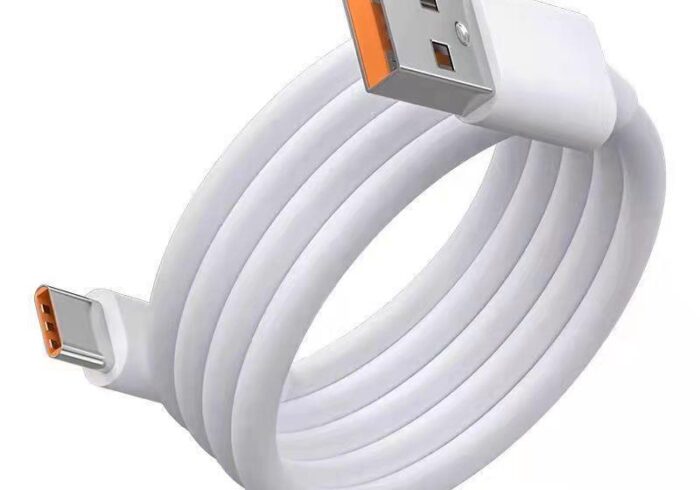
A USB to earphone jack converter is a device that connects to a USB port on one end and has a standard 3.5mm audio jack on the other. Its primary function is to convert digital audio signals from the USB port into analog signals that can be transmitted through the 3.5mm jack to headphones, speakers, or other audio devices.
How Does It Work?
When you plug a USB to earphone jack converter into a USB port, it receives digital audio data from the device. Inside the converter is a digital – to – analog converter (DAC), which transforms the digital signals into analog audio signals. These analog signals are then sent through the 3.5mm jack to your headphones or speakers, producing sound. Some converters also feature amplifiers to boost the audio signal for better sound quality and volume.

Benefits of USB to Earphone Jack Converter
Enhanced Audio Quality
Many USB to earphone jack converters come with high – quality DACs and amplifiers that can significantly improve audio quality compared to the built – in sound cards of most computers and devices.
Increased Compatibility
With the removal of 3.5mm jacks from many modern devices like smartphones and laptops, a USB to earphone jack converter allows you to continue using your favorite wired headphones or audio equipment that only have 3.5mm connectors. It also enables you to connect USB audio devices to systems that only have audio jacks, such as older computers, home stereos, or car audio systems.
Versatility and Convenience
These converters are small, portable, and easy to use. They can be quickly plugged into any USB port, making them perfect for both home and travel use. They also eliminate the need to purchase new audio equipment with USB connectivity, saving you money and reducing electronic waste.
Additional Features
Some USB to earphone jack converters offer extra features like microphone support for calls and recordings, volume controls, and even RGB lighting for gamers. They can also free up a USB port on your device for other uses while still allowing you to enjoy audio through the headphone jack.
Types of USB to Earphone Jack Converters
USB – A to 3.5mm Converters
These are the most common types of converters and are designed for devices with standard USB – A ports, such as desktop computers, laptops, and some gaming consoles. They are ideal for connecting wired headphones, speakers, or microphones to these devices.
USB – C to 3.5mm Converters
With the increasing popularity of USB – C ports in modern devices like smartphones, tablets, and newer laptops, USB – C to 3.5mm converters have become essential. They allow you to connect your 3.5mm audio devices to these newer devices that lack a traditional headphone jack.
USB Sound Cards
USB sound cards are more advanced audio solutions that provide not only a 3.5mm headphone jack but also additional audio inputs and outputs. They often come with high – performance DACs and amplifiers for superior audio quality and may support features like surround sound, multiple audio channels, and advanced audio processing. They are suitable for audio enthusiasts, gamers, musicians, and professionals who require higher – fidelity audio and more audio functionality.
Factors to Consider When Choosing a USB to Earphone Jack Converter
Audio Quality
Look for converters with high – quality DACs and amplifiers from reputable brands like ESS, Cirrus Logic, or Texas Instruments. Check the specifications for the bitrate and sample rate support. Higher values like 24 – bit/96kHz or higher indicate better audio quality.
Compatibility
Ensure the converter is compatible with your device’s operating system (Windows, Mac, Linux, Android, iOS, etc.) and USB port type (USB – A, USB – C, or USB – B). Also, consider whether it supports both audio playback and recording if you plan to use a microphone.
Build Quality and Durability
Opt for converters with sturdy metal housings or durable plastic casings that can withstand regular use and travel. Check for any exposed wires or weak points in the construction that might make the converter prone to damage.
Ease of Use
Some converters are plug – and – play, requiring no additional software or drivers, while others may need you to install specific drivers or configure settings on your device. Choose based on your technical comfort level.
Additional Features
If you need microphone support for calls or recordings, ensure the converter has a built – in microphone or a separate microphone input. For on – the – go adjustments, look for converters with inline volume controls. Gamers might appreciate converters with low – latency modes and RGB lighting.
Top USB to Earphone Jack Converters on the Market
Plugable USB 2.0 Audio Adapter
Plugable offers a reliable and widely – compatible USB to audio adapter that provides both 3.5mm headphone and microphone jacks. It works with Windows, Mac, Linux, Android, and Chrome OS and is known for its good audio quality and stable performance. The adapter is compact and portable, making it easy to carry around for use with different devices.
Apple USB – C to 3.5mm Headphone Jack Adapter
Apple’s official USB – C to 3.5mm headphone jack adapter is perfect for Apple users with devices like the iPhone 12 or later, iPad Pro, and MacBook Pro. It delivers high – quality audio and supports analog audio signals, allowing you to connect your favorite headphones or speakers with a standard 3.5mm jack to your Apple device.
Sabrent USB 3.0 to 3.5mm External Stereo Sound Card Adapter
Sabrent’s USB 3.0 to 3.5mm external sound card adapter is a great option for those seeking enhanced audio quality. It features a high – performance DAC and supports high – resolution audio up to 24 – bit/192kHz. The adapter also includes a built – in microphone for voice calls and recordings and has a sleek, compact design.
UGREEN USB to 3.5mm Audio Jack Adapter
UGREEN is a well – known brand in the tech accessories space, and its USB to 3.5mm audio jack adapter is no exception. This adapter is compatible with a wide range of devices, including Windows and Mac computers, as well as gaming consoles like PlayStation and Xbox. It delivers clear audio and has a durable build quality.
Anker Soundcore USB – C to 3.5mm Audio Adapter
Anker’s Soundcore USB – C to 3.5mm audio adapter is designed with a focus on audio quality and convenience. It supports aptX for low – latency audio transmission, making it suitable for gaming and video watching. The adapter also has a compact size and a sturdy build, with a metal housing that provides protection against wear and tear.
How to Set Up and Use a USB to Earphone Jack Converter
Plug – and – Play Setup
Most USB to earphone jack converters are plug – and – play devices. Simply plug the USB end into an available USB port on your device, and the other end into your headphones or audio equipment. Your device should automatically recognize the converter and configure the necessary settings. You can then play audio or record sound through the converter.
Driver Installation (If Required)
Some advanced USB sound cards or converters may require you to install specific drivers or software to unlock their full functionality. Follow the manufacturer’s instructions to download and install the required drivers onto your computer. Restart your device if prompted to ensure the drivers are properly installed.
Configuring Audio Settings
After connecting the converter, go to your device’s audio settings to select it as the default playback and/or recording device. This ensures that audio is routed through the converter to your headphones or speakers. You may also need to adjust the volume levels and audio balance through the device’s settings or the converter’s accompanying software (if applicable).
Troubleshooting Common Issues with USB to Earphone Jack Converters
No Sound Output
If you’re not getting any sound from your headphones or speakers after connecting the converter, try the following:
- Check that the converter is securely plugged into the USB port and the audio jack.
- Verify that the audio device (headphones, speakers) is properly connected to the converter and functioning correctly by testing it with another audio source.
- Ensure that the converter is selected as the default audio playback device in your device’s audio settings.
- Restart your device and the audio equipment to refresh the connection.
- Update the drivers for the converter or your device’s audio system if available.
Poor Audio Quality
If the audio quality is not up to your expectations, consider these steps:
- Use a higher – quality USB to earphone jack converter with a better DAC and amplifier.
- Check for any interference from other electronic devices or cables near the converter and move them away if possible.
- Adjust the audio settings on your device, such as the audio enhancement features or equalizer settings, to optimize the sound for your specific audio equipment.
- Ensure that you’re using high – quality audio files and that your audio streaming service is set to the highest possible audio quality.

Compatibility Problems
If you’re experiencing compatibility issues between the converter and your device, try the following:
- Check the manufacturer’s specifications to confirm that the converter is compatible with your device’s operating system and USB version.
- Look for firmware or driver updates for the converter or your device that may resolve compatibility problems.
- Try using the converter with a different USB port on your device or with another device altogether to determine if the issue is specific to one port or device.
Conclusion
USB to earphone jack converters are invaluable tools in today’s tech landscape, offering solutions for audio connectivity challenges. They provide enhanced audio quality, increased compatibility, and added convenience for users with various audio needs. With a wide range of options available, from basic adapters to advanced USB sound cards, there’s a converter suitable for everyone’s requirements and budget.
When selecting a converter, prioritize audio quality, compatibility with your devices, build quality, and any additional features that may enhance your audio experience. By considering these factors and following the setup and troubleshooting guidelines provided, you can enjoy seamless audio connectivity and immersive sound through your favorite headphones or speakers.
How to Purchase:https://looperbuy.com/search?keywords=usb+to+earphone+jack
Related Questions and Answers
Q: Do USB to earphone jack converters work with all devices?
A: USB to earphone jack converters are compatible with a wide range of devices that have USB ports, including computers, laptops, smartphones, tablets, and gaming consoles. However, compatibility may vary depending on the specific converter and device. Always check the manufacturer’s specifications to ensure it works with your particular device and operating system.
Q: Can USB to earphone jack converters improve audio quality?
A: Yes, many USB to earphone jack converters can enhance audio quality. They often feature high – quality DACs and amplifiers that outperform the built – in sound cards of most devices, resulting in clearer, richer sound with better dynamic range and lower distortion. For audiophiles and those who appreciate good audio, a quality converter can make a significant difference in the listening experience.
Q: Are USB to earphone jack converters easy to use?
A: Most USB to earphone jack converters are designed for ease of use. They typically require no additional software or drivers and can be plugged in and used immediately. Simply connect the USB end to your device and the 3.5mm end to your headphones or speakers, and you’re ready to go. Some advanced models may offer additional features that require configuration through accompanying software, but the basic functionality is usually plug – and – play.
Q: How do I choose the right USB to earphone jack converter for my needs?
A: To choose the right converter, consider factors such as audio quality requirements, device compatibility, build quality, and desired additional features. If you’re a gamer or audio professional, look for converters with low – latency modes and support for high – resolution audio. For general use, a basic converter with good reviews for sound quality and reliability should suffice. Always read product descriptions and customer reviews to get an idea of other users’ experiences with the converter.
Q: Can I use multiple USB to earphone jack converters on the same device?
A: Yes, you can use multiple USB to earphone jack converters on the same device if you have enough USB ports available. This allows you to connect multiple audio devices simultaneously, such as different sets of headphones for a group listening session or separate speakers for different purposes. However, ensure that your device’s audio settings are configured correctly to route audio to the desired converter and audio output.
Hot Tags: USB to Earphone Jack Converter; USB to 3.5mm Audio Adapter; USB Sound Card; Digital to Analog Converter; Audio Quality Enhancement; Headphone Jack Adapter; USB Audio Converter; Earphone Jack Converter; Audio Connectivity Solution; USB DAC Converter