Table of Contents
Introduction
In the digital age, the computer mouse has evolved from a simple peripheral to a sophisticated tool that can significantly impact productivity, gaming performance, and overall user experience. With countless options available in the market, selecting the right mouse can be overwhelming. This comprehensive guide aims to demystify the world of computer mice, providing insights into various types, features, and considerations to help you find the perfect click companion for your needs.
The Evolution of Computer Mice
From Mechanical to Optical
The journey of computer mice began with mechanical balls that tracked movement through physical contact with surfaces. These early models were prone to dirt accumulation and required frequent cleaning. The advent of optical technology revolutionized mouse functionality, using light to detect movement with greater precision and minimal maintenance.
Wireless Revolution
One of the most transformative advancements in mouse technology was the introduction of wireless connectivity. Initially met with skepticism due to concerns about latency and battery life, wireless mice have evolved to offer performance nearly indistinguishable from their wired counterparts. This leap in technology granted users unprecedented freedom of movement and reduced cable clutter.
Types of Computer Mice
Wired Mice: The Classics
Wired mice remain popular for their reliability and lower latency, making them ideal for tasks requiring precision such as graphic design and professional gaming. They eliminate concerns about battery life and provide a consistent connection. Modern wired mice often feature lightweight designs and ergonomic shapes to enhance comfort during extended use.
Wireless Mice: Freedom at a Premium
Wireless mice have become mainstream, offering the advantage of mobility without sacrificing much in terms of performance. They utilize Bluetooth or proprietary USB receivers for connectivity. High-end models boast impressive battery life, sometimes lasting over a year on a single charge, and deliver responsive performance suitable for most users, including gamers.
Gaming Mice: Precision and Power
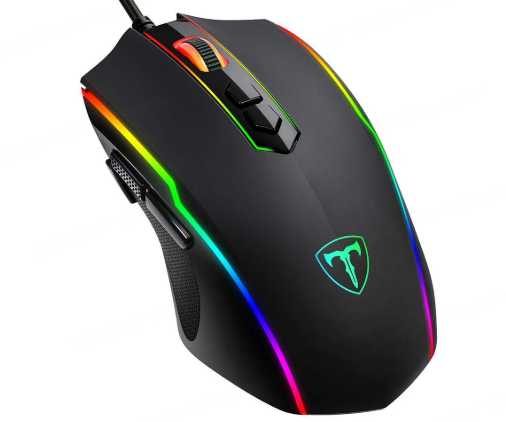
Designed for enthusiasts and competitive gamers, gaming mice prioritize precision, speed, and programmability. They often come equipped with high-DPI sensors for tracking minute movements, additional programmable buttons for in-game commands, and customizable RGB lighting. Some models even feature adjustable weights to tailor the mouse’s feel to individual preferences.
Ergonomic Mice: Comfort in Design
Ergonomic mice address the physical strain associated with prolonged computer use. They feature designs that encourage natural hand positioning, reducing the risk of repetitive strain injuries. Vertical grip designs, for instance, mimic the neutral position of a handshake, minimizing wrist deviation. These mice are particularly beneficial for users who experience discomfort during extended sessions.
Key Features to Consider
Sensor Technology and DPI
The sensor is the heart of any mouse, determining how accurately it translates movement into cursor action. DPI (Dots Per Inch) measures sensitivity; a higher DPI means the cursor moves further with less physical movement of the mouse. While higher DPI can be advantageous for gaming and large screens, it’s crucial to find a balance that suits your control needs and screen resolution.
Buttons and Programmability
The number and functionality of buttons vary widely among mice. Basic models offer primary left and right buttons, a scroll wheel, and sometimes a back/forward button. Advanced mice can have up to twenty or more programmable buttons. For productivity, additional buttons can streamline tasks like switching applications or scrolling through documents. Gamers can assign complex actions or macros to buttons for a competitive edge.
Connectivity Options
Wired mice provide a straightforward plug-and-play experience with no setup required. Wireless mice, however, offer choices between Bluetooth (which is convenient but may have connectivity limitations in areas with interference) and USB dongles (which provide more stable connections but require a dedicated port). Dual-mode mice offer flexibility by supporting both connection types.
Battery Life and Charging
For wireless users, battery life is a critical consideration. Some mice offer impressive longevity, with certain models lasting up to 18 months on a single charge. Fast charging and wireless charging capabilities are becoming more common, reducing downtime. Look for mice with indicators that alert you when battery levels are low.
Gaming Mice Deep Dive
High-Performance Sensors
Gaming mice often utilize top-tier sensors from companies like PixArt and PMW (PixArt and PixArt-derived sensors). These sensors can achieve DPI ranges from 10,000 to an astonishing 30,000, allowing for precise control in fast-paced gaming scenarios. The ability to switch DPI on the fly helps gamers adapt to different playstyles and game genres.
Customization and Software
Many gaming mice come with companion software that allows for extensive customization. Users can program buttons, adjust RGB lighting patterns, and fine-tune sensor performance. Some software even enables cloud saving of profiles, ensuring your settings are consistent across multiple devices.
Build Quality and Durability
Given the intense use they undergo, gaming mice are built to withstand rigorous activity. Reinforced buttons, durable materials, and braided cables (for wired gaming mice) are common features. The investment in a quality gaming mouse is justified by its longevity and consistent performance.

Ergonomic Mice: Health and Comfort
Understanding Ergonomic Design
Ergonomic mice are designed with the human body in mind. They aim to reduce muscle strain by encouraging natural hand and wrist positions. Features like contoured shapes, thumb rests, and varying grip styles cater to different user preferences and physical needs.
Health Benefits
Prolonged use of traditional mice can lead to conditions like carpal tunnel syndrome and tendonitis. Ergonomic designs help distribute pressure more evenly and minimize awkward joint angles, potentially reducing the risk of such injuries. They are especially recommended for individuals who spend several hours daily at a computer.
Vertical vs. Horizontal Grip
Vertical grip mice position the hand in a handshake-like posture, which can reduce wrist pronation (the inward rotation of the forearm). Horizontal grip mice, closer to traditional designs, may incorporate other ergonomic elements like angled palm rests. The choice between these depends on personal comfort and physical requirements.
Making the Right Choice
Assessing Your Needs
Before purchasing, consider how you’ll primarily use the mouse. For general office work, a reliable wired or wireless mouse with a comfortable grip may suffice. Gamers will benefit from high-DPI sensors and programmable features. Those concerned about health impacts should prioritize ergonomic designs.
Budget Considerations
Mice span a wide price range, from budget options under $20 to premium models exceeding $200. Determine your budget and look for models that offer the best value within that range. Remember that investing in a quality mouse can provide long-term savings by reducing the frequency of replacements and potential medical costs from injuries.
Testing and Reviews
Whenever possible, test mice in person to gauge comfort and control. Online reviews and professional testing can also provide insights into performance and durability. Pay attention to both positive and negative feedback to form a balanced view of each product.
Conclusion
The world of computer mice offers a diverse array of options tailored to different user needs, from the no-nonsense reliability of wired mice to the cutting-edge performance of gaming models and the health-conscious designs of ergonomic mice. By understanding the features that matter most to your specific use case and prioritizing comfort and functionality, you can select a mouse that enhances your computing experience. Whether you’re a gamer seeking the edge in competition, a professional aiming for productivity, or someone looking to reduce physical strain, there’s a perfect click companion waiting to be discovered.
How to Purchase:https://looperbuy.com/search?keywords=computer+mice
Questions & Answers
What is the difference between optical and laser mouse sensors?
Optical sensors use LED light to track surface patterns, offering accurate tracking on most surfaces with lower power consumption. Laser sensors use laser beams for even more precise tracking, especially on challenging surfaces, but may consume more power and sometimes exhibit ‘laser line’ artifacts on certain materials.
Can wireless mice match the performance of wired mice for gaming?
Modern wireless mice have closed the performance gap significantly. High-end models offer latency as low as 1 millisecond, making them viable for competitive gaming. Some professional esports players now prefer wireless mice for their reduced drag and improved freedom of movement.
How often should I clean my mouse?
Cleaning frequency depends on usage and environment. For optical mice, wiping the sensor with a lint-free cloth every few weeks is sufficient. Mechanical components, if any, should be cleaned as needed, typically when you notice reduced performance or tracking issues.
Are all mice compatible with both PC and Mac?
Most mice are compatible with both platforms, especially those using standard USB or Bluetooth connections. Some high-end gaming mice with specialized software may require additional setup or have limited functionality on one platform, so check compatibility before purchasing.
What is RGB lighting, and is it useful beyond aesthetics?
RGB lighting refers to customizable multi-color lighting effects. While primarily aesthetic, some users find it helps in identifying different profiles or modes at a glance. It can also be part of a cohesive desktop lighting setup for ambiance.