In an increasingly globalized world, the ability to communicate in multiple languages is more important than ever. For those who speak Arabic or are learning the language, mastering the Arabic computer keyboard is essential. This article will explore the layout, features, and benefits of using an Arabic keyboard, as well as tips for effective typing and common challenges faced by users.
Table of Contents
Understanding the Arabic Keyboard Layout
The Basics of the Arabic Keyboard
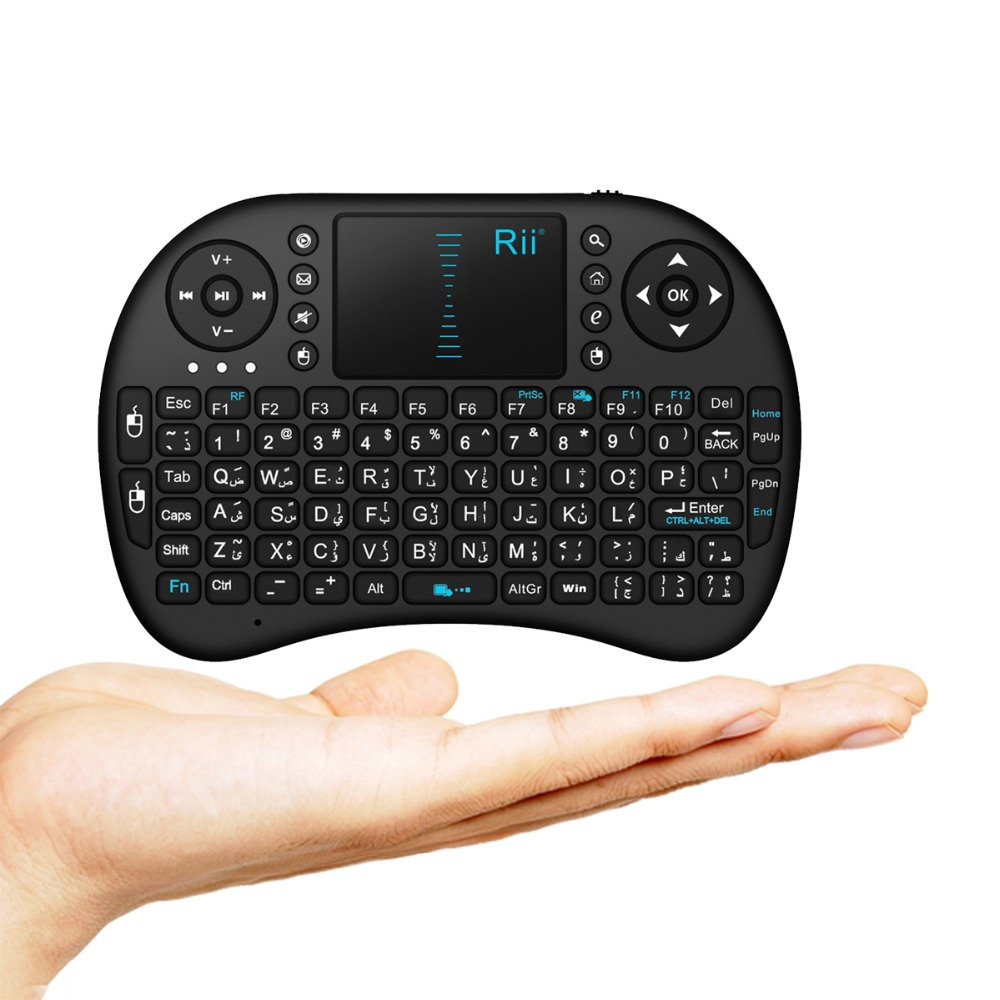
The Arabic keyboard layout is designed to accommodate the Arabic alphabet, which consists of 28 letters. Unlike the Latin alphabet, Arabic is written from right to left, which influences the design of the keyboard. Most Arabic keyboards also include Latin letters, allowing users to switch between languages seamlessly.
The standard Arabic keyboard layout is similar to the QWERTY layout used in English keyboards, but the keys are arranged differently to accommodate Arabic characters. The most common layout is the Arabic 101 layout, which is widely used in many Arabic-speaking countries. This layout includes all the Arabic letters, as well as punctuation marks and special characters necessary for typing in Arabic.
Key Features of the Arabic Keyboard
- Bilingual Functionality: Most Arabic keyboards feature both Arabic and Latin characters, making it easy for users to type in both languages. This is particularly useful for those who frequently switch between Arabic and English.
- Special Characters: The Arabic keyboard includes special characters and diacritics that are essential for proper Arabic writing. These characters help indicate vowel sounds and other grammatical features.
- Right-to-Left Orientation: The design of the Arabic keyboard reflects the right-to-left writing direction of the Arabic language. This orientation is crucial for ensuring that text appears correctly on the screen.
- Ergonomic Design: Many Arabic keyboards are designed with ergonomics in mind, providing a comfortable typing experience. This is especially important for users who spend long hours typing.

Benefits of Using an Arabic Keyboard
Enhanced Typing Speed
Using an Arabic keyboard can significantly improve typing speed for Arabic speakers. The layout is specifically designed for the Arabic language, allowing users to type more efficiently without having to switch between different keyboard layouts. This is particularly beneficial for students, professionals, and anyone who frequently communicates in Arabic.
Improved Accuracy
Typing in Arabic using an Arabic keyboard reduces the likelihood of errors. The keyboard layout is tailored to the language, making it easier to find the correct characters and symbols. This is especially important for formal writing, such as academic papers or business correspondence.
Greater Comfort
For native Arabic speakers, using an Arabic keyboard can be more comfortable than using a standard QWERTY keyboard. The familiar layout allows for a more natural typing experience, reducing strain on the hands and wrists.
Accessibility
Arabic keyboards are widely available and can be easily integrated into various devices, including laptops, desktops, and tablets. Many operating systems also support Arabic input, making it easy to switch between languages.
How to Type Effectively on an Arabic Keyboard
Familiarize Yourself with the Layout
Before you start typing, take some time to familiarize yourself with the Arabic keyboard layout. Practice locating the letters and special characters to build muscle memory. You can find printable keyboard layouts online to help you visualize the arrangement of keys.
Use Typing Software
Consider using typing software or online tools designed to help users learn to type in Arabic. These programs often include exercises and games that can improve your typing speed and accuracy. Some popular options include TypingClub and Keybr.
Practice Regularly
Like any skill, regular practice is essential for mastering the Arabic keyboard. Set aside time each day to practice typing in Arabic. You can start with simple sentences and gradually increase the complexity of your writing as you become more comfortable.
Utilize Shortcuts
Familiarize yourself with keyboard shortcuts that can enhance your typing efficiency. For example, many Arabic keyboards allow users to switch between Arabic and English input with a simple key combination. Learning these shortcuts can save you time and make your typing experience smoother.
Common Challenges and Solutions
Switching Between Languages
One of the most common challenges faced by users of Arabic keyboards is switching between Arabic and English input. This can be particularly frustrating for those who frequently communicate in both languages.
Solution: Most operating systems allow users to customize keyboard shortcuts for switching languages. Familiarize yourself with these shortcuts to make the transition smoother.
Typing Diacritics
Arabic diacritics can be challenging for new users, as they are not always included on the keyboard. These marks are essential for proper pronunciation and meaning.
Solution: Practice typing with diacritics by using typing software that includes exercises for these characters. Over time, you will become more comfortable incorporating them into your writing.
Finding the Right Keyboard
Not all Arabic keyboards are created equal. Some may have different layouts or features that can affect your typing experience.
Solution: Research different Arabic keyboard options before making a purchase. Look for keyboards that are well-reviewed and offer the features you need, such as bilingual functionality and ergonomic design.
The Different Types of Arabic Keyboard Layouts
Arabic 101 Layout
The Arabic 101 layout is the most commonly used keyboard layout for Arabic typing. It includes all the Arabic letters and is designed for standard typing tasks. This layout is widely supported across various operating systems and is suitable for most users.
Arabic 102 Layout
The Arabic 102 layout is similar to the 101 layout but includes additional keys for typing diacritics and special characters. This layout is often preferred by users who need to type in Arabic for academic or professional purposes, as it provides greater flexibility.
Phonetic Arabic Layout
The phonetic Arabic layout is designed for users who are more comfortable with the Latin alphabet. This layout allows users to type Arabic letters using Latin characters, making it easier for those who are transitioning to Arabic typing. For example, typing “b” produces the Arabic letter “ب”.
Customizable Layouts
Some users may prefer to create their own custom keyboard layouts to suit their specific typing needs. This can be done using software tools that allow users to remap keys and create personalized layouts. Customizable layouts are particularly useful for users who frequently type in multiple languages or require specific characters.
Installing an Arabic Keyboard Layout
On Windows
- Open Settings: Go to the Start menu and select “Settings.”
- Time & Language: Click on “Time & Language” and then select “Language.”
- Add a Language: Click on “Add a language” and search for Arabic. Select the desired Arabic dialect and click “Next.”
- Install the Language Pack: Follow the prompts to install the language pack and set it as your preferred language.
- Switching Layouts: You can switch between languages using the language bar on the taskbar or by using the keyboard shortcut (usually Alt + Shift).
On macOS
- System Preferences: Open “System Preferences” from the Apple menu.
- Keyboard: Click on “Keyboard” and then select the “Input Sources” tab.
- Add Input Source: Click the “+” button to add a new input source. Search for Arabic and select the desired layout.
- Switching Layouts: You can switch between input sources using the menu bar or by using the keyboard shortcut (usually Command + Space).
Conclusion
Mastering the Arabic computer keyboard is an essential skill for anyone who speaks or is learning Arabic. By understanding the layout, benefits, and effective typing techniques, you can enhance your communication skills and typing efficiency. With regular practice and the right tools, you can become proficient in typing Arabic and enjoy the many advantages that come with it.
How to purchase:Online B2B sourcing platform, China purchase, Chinese suppliers – LooperBuy
Frequently Asked Questions
1. What are the different types of Arabic keyboard layouts available?
The most common Arabic keyboard layouts include the Arabic 101 layout, Arabic 102 layout, phonetic Arabic layout, and customizable layouts. Each layout serves different typing needs and preferences.
2. How do I install an Arabic keyboard layout on Windows or macOS?
On Windows, go to Settings > Time & Language > Language, and add Arabic. On macOS, open System Preferences > Keyboard > Input Sources, and add Arabic. You can switch between layouts using keyboard shortcuts.
3. What are some common mistakes to avoid when learning to type on an Arabic keyboard?
Common mistakes include not familiarizing yourself with the layout, neglecting to practice regularly, and forgetting to use diacritics when necessary. It’s important to take your time and practice consistently.
4. Can I use an Arabic keyboard on my laptop?
Yes, most laptops support Arabic keyboards. You can either purchase an external Arabic keyboard or use keyboard stickers to label your existing keys with Arabic characters.
5. Are there typing software programs available for learning Arabic typing?
Yes, there are several typing software programs and online tools designed to help users learn to type in Arabic. Some popular options include TypingClub and Keybr.
HOT TAG:Arabic computer keyboard, typing in Arabic, keyboard layout, bilingual typing, language learning tools, typing software, diacritics practice, keyboard shortcuts, ergonomic design, language input methods, Arabic typing speed, online resources, phonetic keyboard layout, cultural communication, multilingual typing skills.