SATA data cables are essential components in modern computing, facilitating the connection between storage devices and motherboards. These cables are not just simple connectors; they play a crucial role in ensuring that data is transferred efficiently and reliably between the various components of a computer system. This article delves into the various aspects of SATA data cables, including their usage, types, installation, and performance characteristics. By the end, you will have a comprehensive understanding of SATA data cables and their significance in data transfer.
Table of Contents
The Usage of SATA Data Cables
SATA data cables are primarily used for connecting storage devices, such as hard drives and solid-state drives (SSDs), to a computer’s motherboard. These cables are designed to transfer data between the storage device and the motherboard, enabling the system to read and write data efficiently. The importance of these cables cannot be overstated, as they are integral to the overall performance of the computer.
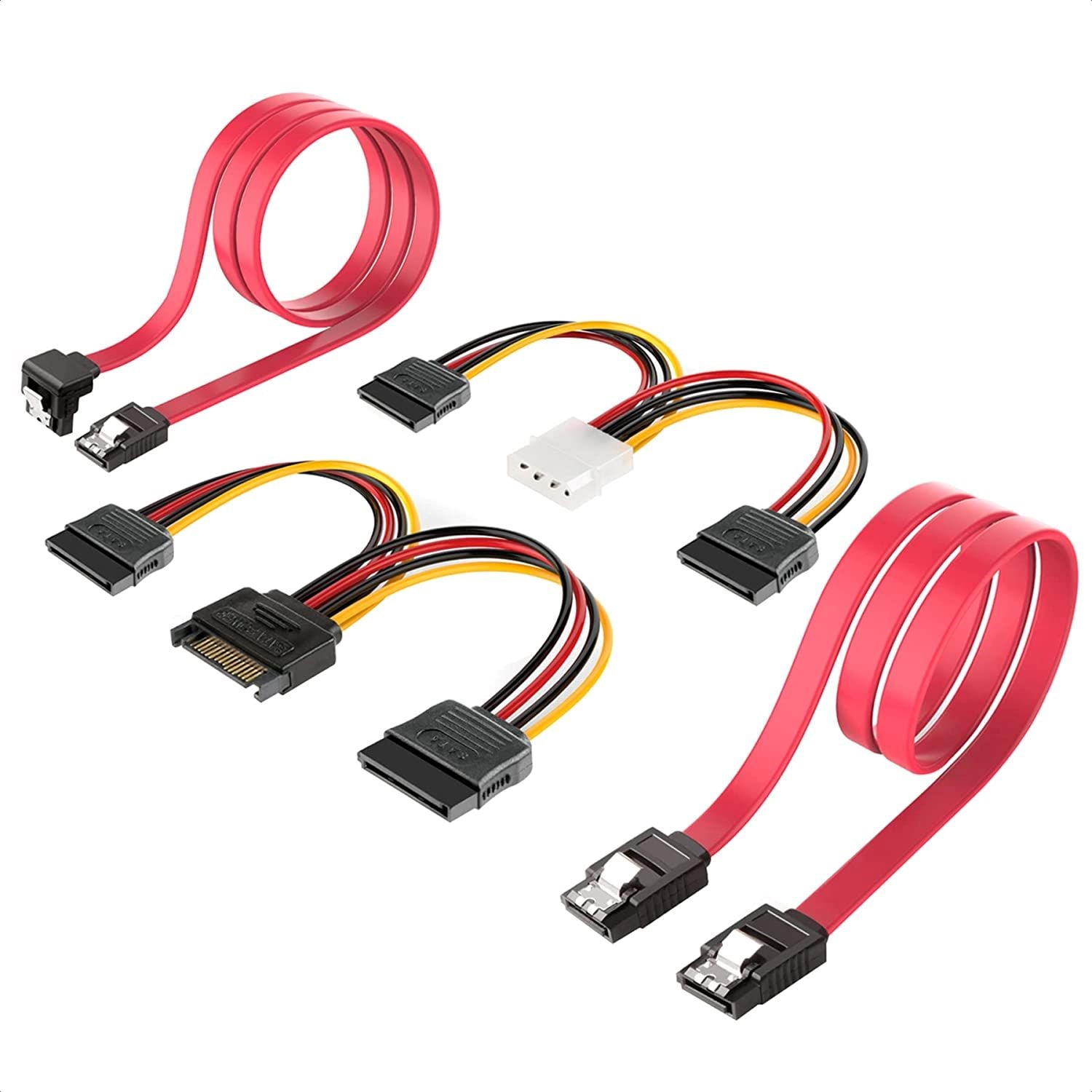
The typical SATA data cable features a 7-pin connector on both ends. One end connects to the storage device, while the other connects to the motherboard’s SATA port. This connection is crucial for the operation of the storage device, as each SATA hard drive requires a separate data cable and port. Unlike older technologies, SATA cables are thinner and more flexible, allowing for better airflow and easier cable management within the computer case. This design not only enhances the aesthetic appeal of the build but also contributes to better cooling, which is vital for maintaining optimal performance.
SATA data cables are also known for their ease of installation. They can be connected without any special tools, making them user-friendly for both novice and experienced computer builders. The angled connectors on some SATA cables further enhance their usability, allowing for connections in tight spaces. This ease of use is particularly beneficial for those who frequently upgrade or replace components, as it minimizes the time and effort required to make changes to the system.

Types of SATA Data Cables
There are several types of SATA data cables, each designed for specific applications. The most common types include:
Standard SATA Data Cables
These are the most widely used SATA cables, featuring a standard 7-pin connector on both ends. They are suitable for connecting most SATA hard drives and SSDs to motherboards. The standard SATA cable is versatile and can support various storage devices, making it a staple in most computer builds.
Slim SATA Data Cables
Slim SATA cables are designed for use in compact devices, such as laptops and ultrabooks. They are thinner than standard SATA cables, making them ideal for tight spaces where traditional cables may not fit. This type of cable is particularly useful in portable devices where space is at a premium, ensuring that manufacturers can maintain a sleek design without compromising functionality.
eSATA Cables
eSATA (External SATA) cables are used for connecting external SATA devices to a computer. These cables are designed to provide the same high-speed data transfer as internal SATA cables but are built to withstand external conditions. eSATA cables are often used for external hard drives, allowing users to expand their storage capacity without opening their computer cases. This flexibility is essential for users who require additional storage for backups or large files.
Mini SATA Cables
Mini SATA cables are used for connecting smaller storage devices, such as SSDs in ultrabooks or tablets. They are compact and designed to fit in limited spaces, making them ideal for modern devices that prioritize portability and efficiency. The mini SATA interface is particularly popular in the mobile computing market, where size and weight are critical factors.
SATA to USB Adapters
These adapters allow SATA devices to connect to USB ports, enabling the use of SATA drives as external storage. This is particularly useful for data recovery or transferring files between computers. SATA to USB adapters provide a convenient solution for users who need to access data from SATA drives without installing them internally, making them a valuable tool for technicians and everyday users alike.
How to Install SATA Data Cables
Installing SATA data cables is a straightforward process that can be accomplished with minimal effort. Here’s a step-by-step guide to help you through the installation:
1. Power Off the Computer: Before starting, ensure that the computer is completely powered off and unplugged from the electrical outlet to avoid any electrical hazards. This step is crucial for your safety and to prevent any damage to the components.
2. Open the Computer Case: Remove the side panel of the computer case to access the internal components. This usually involves unscrewing a few screws or using a latch mechanism. Make sure to keep the screws in a safe place to avoid losing them during the process.
3. Locate the Storage Device: Identify the storage device (HDD or SSD) that you want to connect. Ensure that it is securely mounted in its designated bay. Proper mounting is essential to prevent vibrations that could lead to data loss or hardware damage.
4. Connect the SATA Data Cable: Take the SATA data cable and connect one end to the SATA port on the storage device. The connector should fit snugly into the port. Connect the other end of the cable to an available SATA port on the motherboard. Ensure that the connection is firm to avoid any data transfer issues.
5. Connect the SATA Power Cable: In addition to the data cable, you will need to connect a SATA power cable from the power supply unit to the storage device. This cable typically has a wider connector and is designed to provide power to the drive. Without this connection, the storage device will not function.
6. Organize the Cables: After connecting the cables, ensure that they are neatly organized to avoid obstructing airflow within the case. Use cable ties or Velcro straps to secure the cables if necessary. Proper cable management not only improves airflow but also makes future upgrades easier.
7. Close the Computer Case: Once everything is connected and organized, replace the side panel of the computer case and secure it with screws. This step protects the internal components from dust and damage.
8. Power On the Computer: Plug the computer back into the electrical outlet and power it on. The operating system should recognize the newly connected storage device. If the device does not appear, check the connections and ensure that the BIOS settings are configured correctly.
Performance Characteristics of SATA Data Cables
SATA data cables are known for their high performance and reliability. The performance of these cables is influenced by several factors, including their design, length, and the version of SATA technology they support.
Data Transfer Speeds
SATA technology has evolved over the years, with different versions offering varying data transfer speeds. The original SATA (SATA I) supports speeds of up to 1.5 Gbps, while SATA II can handle up to 3 Gbps. The latest version, SATA III, supports speeds of up to 6 Gbps. This increase in speed allows for faster data transfer rates, which is crucial for tasks such as gaming, video editing, and large file transfers. The ability to transfer data quickly can significantly enhance the overall performance of a computer, especially when dealing with large files or running multiple applications simultaneously.
Cable Length
The length of SATA data cables can affect performance. While SATA cables can be up to 1 meter long, longer cables may experience signal degradation, leading to slower data transfer rates. It is generally recommended to use the shortest cable possible for optimal performance. This is particularly important in high-performance setups where every millisecond counts, such as in gaming or professional content creation.
Signal Integrity
SATA cables use differential signaling, which helps reduce electromagnetic interference and improves data integrity. This feature is particularly important in environments with a lot of electronic noise, ensuring that data is transmitted accurately and without corruption. High-quality SATA cables are designed to maintain signal integrity over longer distances, making them suitable for various applications.
Compatibility
SATA data cables are designed to be backward compatible, meaning that newer SATA cables can be used with older SATA devices. However, to achieve the highest performance, it is advisable to use cables that match the specifications of the devices being connected. This compatibility ensures that users can upgrade their systems without needing to replace all their existing cables, providing flexibility and cost savings.
Conclusion
SATA data cables play a vital role in modern computing, enabling efficient data transfer between storage devices and motherboards. Understanding their usage, types, installation process, and performance characteristics is essential for anyone looking to build or upgrade a computer system. With the right SATA data cable, users can ensure optimal performance and reliability for their storage solutions. As technology continues to advance, the importance of high-quality SATA data cables will only grow, making them a critical component in any computer setup.
How to purchase:https://looperbuy.com/search?keywords=SATA+Data+Cables
Frequently Asked Questions
1.What is the main purpose of a SATA data cable?
The main purpose of a SATA data cable is to connect storage devices like hard drives and SSDs to a motherboard, facilitating data transfer between the two.
2.How do I know if my SATA data cable is working?
If your storage device is recognized by the operating system and functions correctly, the SATA data cable is likely working. If not, check the connections and consider replacing the cable.
3.Can I use a SATA data cable with any SATA device?
Yes, SATA data cables are generally compatible with all SATA devices, but using the appropriate version of the cable for optimal performance is recommended.
4.What is the difference between SATA data cables and SATA power cables?
SATA data cables have 7 pins and are used for data transfer, while SATA power cables have 15 pins and provide power to the storage device.
5.How long can SATA data cables be?
SATA data cables can be up to 1 meter long, but shorter cables are recommended to minimize signal degradation and maintain performance.